

📝 Blog Summary
Your SIP traffic is climbing, your backends are uneven, and the HTTP load balancer in front of them is treating calls like web requests. That’s where Kamailio earns its keep. This guide covers how the dispatcher module distributes SIP traffic, the nine routing algorithms and when each one fits, how OPTIONS probing and ds_next_dst() keep calls alive when a backend dies, and a working config you can drop into kamailio.cfg today.
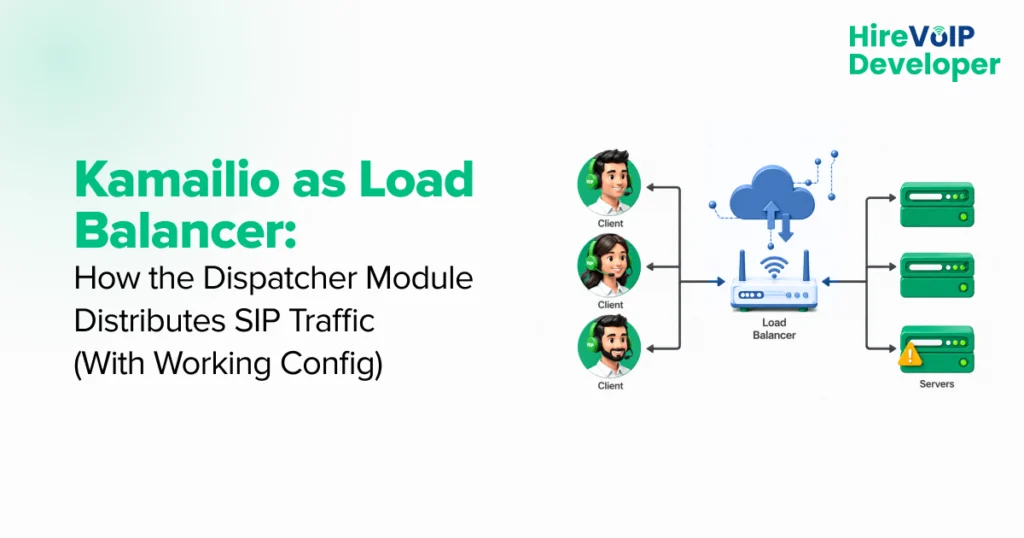
A Kamailio load balancer is an open-source SIP server configured to distribute call signaling traffic across multiple backend servers. It uses the dispatcher module to read a list of destinations, apply a routing algorithm (round-robin, hash, weight, or call-load), and forward each SIP request via ds_select_dst(). This ensures that calls continue to flow even when a backend fails. It’s one of the core patterns Kamailio developers use for VoIP infrastructure transformation at scale.
How Kamailio Dispatcher Load Balancing Works in 4 Steps
Kamailio receives a SIP request, the dispatcher module reads its destination set, an algorithm picks one backend server, and ds_select_dst() forwards the request. If that backend is unresponsive, ds_next_dst() retries the next one in the list.
Here is the mechanism in four steps:
- A SIP request (INVITE, REGISTER, etc.) arrives at the Kamailio proxy.
- The dispatcher module loads the destination set from
dispatcher.listor a database table. - A routing algorithm (round-robin, hash, weight, call-load) selects one active backend server.
ds_select_dst()forwards the request to that server. If it fails,ds_next_dst()rolls to the next destination in the set.
That four-step loop is what makes Kamailio a credible alternative to commercial SIP load balancers. The rest of this guide unpacks each piece.
What Is a Kamailio Load Balancer?
A Kamailio load balancer is a high-performance, open-source SIP server configured to distribute incoming SIP signaling across multiple backend servers using its dispatcher module. It handles routing, health monitoring, and failover at the SIP layer, which generic HTTP load balancers like HAProxy or Nginx cannot do natively.
Most load balancers were built for HTTP. They route packets based on IP, port, and maybe a cookie. SIP is different. SIP is dialog-aware, header-rich, and stateful in ways that an L4 or L7 web load balancer simply does not understand.
Kamailio understands all of it. It parses SIP headers, tracks dialogs, enforces routing policies, and dispatches requests to backend media servers like FreeSWITCH or Asterisk based on rules you write.
Fun Fact
Kamailio used to be called SER (SIP Express Router). It got rebranded in 2008 and has been the workhorse of large-scale VoIP infrastructure ever since. A single Kamailio instance on modest hardware can process tens of thousands of SIP messages per second.
How Does the Kamailio Dispatcher Module Distribute SIP Traffic?
The Kamailio dispatcher module maintains a list of backend SIP destinations grouped into sets. When a SIP request arrives, the module applies a chosen algorithm to pick one destination from the set, then uses ds_select_dst() to forward the request. It also runs OPTIONS pings to mark destinations active or inactive.
The dispatcher module is the engine. Everything else, the list of servers, the algorithm choice, and the failover behavior, is configured on top of it.
Three things make it the right tool for SIP load balancing:
- It is stateless. The module does not need to track call dialogs to dispatch a request, so it scales horizontally without coordination overhead.
- It is lightweight. Memory and CPU footprint stay small even at thousands of calls per second, which is why it ships in embedded SIP appliances.
- It is flexible. You get nine production-tested algorithms out of the box, and you can mix sets for different traffic types (inbound vs. outbound, premium vs. free tier).
Now the fun part, actually wiring it up.
How Do You Configure Kamailio as a SIP Load Balancer?
Configuring Kamailio as a SIP load balancer takes four steps: load the dispatcher.so module, set its parameters, define backend servers in dispatcher. list (or a MySQL table), and write a dispatch route that calls ds_select_dst(). The whole setup fits in under 30 lines of kamailio.cfg.
The example below assumes a fresh Kamailio 5.x install on Ubuntu 22.04 or Debian 12. Adjust file paths if your install lives elsewhere, typically /etc/kamailio/ or /usr/local/etc/kamailio/ .
Step 1: Load the Dispatcher Module
Open kamailio.cfg and add the loadmodule line in the modules section:
loadmodule "dispatcher.so"
That single line pulls the dispatcher module into the running Kamailio instance. On its own, it does nothing; you need parameters and a destination list next.
Step 2: Set the Dispatcher Module Parameters
Add these modparam directives below the loadmodule line. This config uses a flat file for destinations (simplest setup) and enables active health probing via SIP OPTIONS:
modparam("dispatcher", "list_file", "/etc/kamailio/dispatcher.list")
modparam("dispatcher", "flags", 2)
modparam("dispatcher", "ds_ping_method", "OPTIONS")
modparam("dispatcher", "ds_ping_interval", 30)
modparam("dispatcher", "ds_probing_threshold", 3)
modparam("dispatcher", "ds_probing_mode", 1)
modparam("dispatcher", "xavp_dst", "_dsdst_")
Here is what each one does, in plain language:
list_file— full path to the file that holds your backend server list.flags 2— enables failover behavior so ds_next_dst() can roll to the next destination on failure.ds_ping_method OPTIONS– Kamailio sends SIP OPTIONS pings to test each backend.ds_ping_interval 30— probe every 30 seconds.ds_probing_threshold 3— mark a destination inactive after 3 consecutive failures.ds_probing_mode 1— probe all destinations regardless of state, so recovered servers come back online automatically.xavp_dst— holds the ordered destination list for the current request, required for failover.- If you prefer database-driven dispatching (recommended for larger deployments), swap list_file for db_url and table_name, and load the backend servers into MySQL or PostgreSQL instead.
If you prefer database-driven dispatching (recommended for larger deployments), swap list_file for db_url and table_name, and load the backend servers into MySQL or PostgreSQL instead.
Step 3: Define Backend Servers in the dispatcher.list
Create /etc/kamailio/dispatcher.list with one line per backend server. The format is:
# setid(int) destination(sip uri) flags(int) priority(int) attrs(str)
1 sip:10.0.1.10:5060 0 10 weight=50;maxload=200
1 sip:10.0.1.11:5060 0 10 weight=50;maxload=200
1 sip:10.0.1.12:5060 0 5  weight=25;maxload=100

# A second set for outbound trunks
2 sip:trunk-a.carrier.com:5060 0 10 weight=50
2 sip:trunk-b.carrier.com:5060 0 10 weight=50
Set 1 holds three media servers for inbound traffic. Set 2 contains two carrier trunks for outbound traffic. The weight attribute matters only if you choose the weight-based algorithm (covered in the next section). maxload caps the call count per backend when you use call-load distribution.
Step 4: Write the Dispatch Route
Add this block to kamailio.cfg , inside or alongside request_route. It applies round-robin distribution to set 1 and falls through to a 500 response if every destination is down:
route[DISPATCH] {
    # Round-robin across set 1, algorithm 4
    if (!ds_select_dst("1", "4")) {
        send_reply("500", "No destination available");
        exit;
    }
    t_on_failure("FAIL_DISPATCH");
    route(RELAY);
    exit;
}

failure_route[FAIL_DISPATCH] {
    if (t_is_canceled()) { exit; }
    # Backend failed mid-call—roll to the next destination
    if (ds_next_dst()) {
        t_on_failure("FAIL_DISPATCH");
        route(RELAY);
    }
}
Call route(DISPATCH) from your main request_route wherever you want load balancing to kick in, typically for INVITE and REGISTER methods.
Restart Kamailio, push some SIP traffic, and watch INVITEs alternate between your backend servers. You now have a working Kamailio SIP load balancer.
Need help configuring Kamailio for production? Our Kamailio developers handle dispatcher tuning, dialog synchronization, NAT traversal, and TLS hardening every day. Get in touch.
Which Kamailio Dispatcher Algorithm Should You Use?
The Kamailio dispatcher module ships with nine load-balancing algorithms. Round-robin (algorithm 4) is the safe default for stateless traffic. Hash-based algorithms (0, 1, 2) keep the same user pinned to the same backend. Weight (9) and call-load (10) handle uneven backend capacity. Pick by traffic pattern, not by habit.
Every algorithm passes as an integer to ds_select_dst(set_id, algorithm). The kamailio dispatcher's use_round_robin parameter is the most common starting point because it evenly distributes load without requiring weight or load tracking.
The table below covers what each ID actually does:
| ID | Algorithm | Behavior |
|---|---|---|
| 0 | Hash over From URI | Same caller always lands on the same backend, useful for sticky session routing. |
| 1 | Hash over To URI | Same callee always lands on the same backend, keeps in-dialog traffic consistent. |
| 2 | Hash over Request-URI | Routes by the called number; predictable and stateless. |
| 3 | Hash over Call-ID | Most uniform hash distribution; same call ID always hits the same backend. |
| 4 | Round-robin | Cycles through active destinations one by one, the safe default for stateless SIP traffic. |
| 5 | Hash over the auth username | Pins authenticated users to a backend; falls back to round-robin if no username. |
| 6 | Random | Picks a destination at random using rand(); good for quick tests, less predictable for production. |
| 7 | Hash over PV string | Hashes any pseudo-variable you set via hash_pvar, custom routing logic when the built-in hashes don’t fit. |
| 8 | Priority | Serial forking ordered by the priority attribute; primary backend first, fallback next. |
| 9 | Weight-based | Distributes calls proportionally to the weight attribute on each destination. |
| 10 | Call-load | Routes to the backend with the lowest active call count; DUID needs to beset per destination. |
| 11 | Latency-based | Picks the destination with the lowest measured ping latency. |
| 12 | Parallel forking | Sends the request to all destinations in the set at once; first to answer wins. |
| 64 | Round-robin with overload control | Round-robin with congestion-based rate limiting; protects backends from overload spikes. |
A practical rule of thumb:
- Stateless SIP proxy in front of media servers → round-robin (4).
- Sticky user-to-backend mapping needed → hash over From URI (0) or auth username (5).
- Backends with different capacity → weight-based (9).
- Long-lived calls and uneven concurrency → call-load (10).
- Multi-region routing with latency sensitivity → latency-based (11).
Picking the right algorithm is half of a reliable load balancer. The other half is what happens when a backend dies, and that brings us to failover.
How Does Kamailio Handle Failover When a Backend Server Fails?
Kamailio sends periodic SIP OPTIONS pings to every backend in the dispatcher list. After ds_probing_threshold consecutive failures, the destination is marked inactive and removed from rotation. Mid-call failures are caught by failure_route, which uses ds_next_dst() to forward the request to the next destination in the set.
Failover happens at two layers in Kamailio. Knowing both is what separates a load balancer that survives outages from one that drops calls during them.
Active Health Probing
The dispatcher module fires OPTIONS pings on the schedule you set with ds_ping_interval. When a backend stops replying (or replies with a code outside ds_ping_reply_codes), Kamailio decrements its health counter. After ds_probing_threshold failures in a row, the destination flips to inactive and is skipped on future ds_select_dst() calls.
Mid-Call Failover with ds_next_dst()
Active probing protects new requests. Mid-call failover protects requests that hit a backend right as it dies. The failure_route block in step 4 above handles this. When the originally selected destination times out or returns a 5xx response, failure_route fires, ds_next_dst()advances to the next destination in xavp_dst, and the request is re-forwarded transparently.
The caller never sees the failure. They might hear a half-second of silence while Kamailio re-routes, then the call connects normally.
Together, active probing and mid-call failover are what enable Kamailio to promise high availability without an expensive HA appliance next to it. This is a nice segue into the broader benefits of running Kamailio as a load balancer.
What Are the Benefits of Using Kamailio as a SIP Load Balancer?
Kamailio delivers SIP-aware load balancing, automatic failover, horizontal scalability, full open-source flexibility, and a security layer between external callers and internal media servers. It does all of this without licensing fees and runs comfortably on commodity hardware.
Here are the five benefits that matter most in production:
1. SIP-Aware Routing That HTTP Balancers Cannot Match
Kamailio reads SIP headers, tracks dialogs, and applies routing rules based on the message’s actual contents. A traditional load balancer sees packets; Kamailio sees calls. That difference matters every time you need to route based on the called number, originating IP, or auth username.
2. Automatic Failover and High Availability
Active probing, plus ds_next_dst(), means a single backend failure does not result in a customer-facing outage. The dispatcher module handles detection and rerouting on its own; you write the route once and forget it.
3. Horizontal Scalability Without Architecture Changes
Adding a new FreeSWITCH or Asterisk box means adding one line to the dispatcher.list and reloading. Kamailio itself handles thousands of calls per second on modest hardware, so the front door rarely becomes the bottleneck.
4. Open Source, Zero License Cost
Commercial SIP load balancers incur five- and six-figure annual licensing costs. Kamailio is GPL: no license, no per-call fees, no vendor lock-in. The only cost is the engineering time to configure and tune it.
5. Built-In Security Buffer
Sitting Kamailio in front of your media servers hides their internal addresses from the public internet. You can filter malformed SIP, rate-limit suspicious sources, block SIP flooding, and enforce TLS without touching the backends.
Add up these benefits, and Kamailio looks like an obvious win. It is, mostly. But the same flexibility that makes it powerful is also what makes it harder to run than a commercial appliance, and ignoring that side of the trade-off is how teams end up with a Kamailio deployment they cannot maintain.
What Are the Challenges of Running Kamailio as a Load Balancer?
Kamailio is powerful but not plug-and-play. The configuration scripting language has a steep learning curve; there is no built-in GUI; dispatcher list maintenance requires discipline; and built-in health checks are simpler than those offered by HAProxy or commercial SBCs out of the box.
Every one of these challenges is solvable. They are worth knowing up front because they determine how much engineering time your Kamailio deployment will actually cost.
Configuration Complexity
kamailio.cfis a scripting language, not a config file. Loops, conditionals, pseudo-variables, AVPs, XAVPs—it takes time to internalize. A misplaced exit;in a route block can drop traffic silently. New teams almost always need a few iterations to get to production readiness.
No Native GUI
Out of the box, Kamailio gives you a CLI (kamctl) and log files. Real-time monitoring of dispatcher state, traffic distribution, and health probe history requires third-party tooling such as Siremis, Homer, or a custom Grafana setup wired to the JSON-RPC interface.
Ongoing Dispatcher List Maintenance
dispatcher.list is fast and simple, but static. Adding or removing backends means editing the file and calling dispatcher.reload. For dynamic environments (autoscaling media clusters, cloud-hosted media servers), you’ll want database-backed dispatching plus an automation layer to keep the table in sync.
Basic Health Checks Compared to Modern Load Balancers
OPTIONS-based probing tells you that a backend is alive and responding to SIP. It does not tell you whether the backend is healthy at the application layer, the CPU pressure, the transcoding queue depth, or the registration store latency. Production deployments usually layer custom health endpoints (HTTP, htable, or a small status route) on top of the dispatcher’s built-in probing.
None of these is a deal-breaker. There are reasons to budget for a proper setup instead of assuming Kamailio will run itself. To see what a proper setup actually looks like in the wild, the section below walks through a real production deployment.
Wrapping Up
Kamailio is not the easiest SIP load balancer to set up. It is the most flexible one you can run, and once it is configured well, it disappears into the background and just works.
The four-step setup we walked through gets you to a working Kamailio SIP load balancer in an afternoon. What separates that from a production-grade deployment is everything after: algorithm tuning for your actual traffic, TLS hardening, application-layer health checks, and dialog replication across regions. The dispatcher module is the right tool.
The complexity lives in the decisions around it, not in the syntax of kamailio.cfg. Get those decisions right, and Kamailio will quietly route millions of calls a month without ever showing up in your incident channel.
🗝️ KeyTakwawayss
- Kamailio acts as a SIP load balancer through its dispatcher module, which distributes traffic across backend servers using one of fourteen built-in algorithms.
- The
kamailio dispatcher use_round_robin parameter (algorithm 4 ) is the safe default for stateless traffic; switch to call-load (10 ) or weight-based (9 ) when backends have uneven capacity. - Failover happens at two layers: active OPTIONS probing removes dead destinations from rotation, and
ds_next_dst()handles mid-call failures viafailure_route. - Kamailio is free, fast, and SIP-aware, but it demands real expertise in SIP and Kamailio scripting to run reliably in production.
How Hire VoIP Developer Can Help?
Configuring Kamailio is one thing. Configuring it for your traffic patterns, security model, and scale targets is another. Our Kamailio developers handle dispatcher tuning, DMQ sync, NAT traversal, TLS, and RTPEngine integration every day. Get in touch, and we’ll get your SIP infrastructure where it needs to be.