


📝 Blog Summary
With Asterisk 21 removing chan_sip entirely, migration is no longer optional. However, moving from SIP to PJSIP is not a simple “find and replace” operation. It is a fundamental architectural shift from the legacy chan_sip channel driver to the modular res_pjsip stack, which uses an object-based configuration model (endpoint, AOR, auth, transport) and the Sorcery abstraction layer.
This blog outlines a battle-tested PJSIP migration strategy designed to minimize downtime. We cover the “Dual-Stack” approach, a checklist of common mistakes to avoid, and how AI tools can automate configuration generation.
For two decades, chan_sip was the messy but functional core of Asterisk. In Asterisk 21, it is completely removed.
For a small office, this is a nuisance. For a Service Provider or Enterprise managing massive endpoints, it is a critical infrastructure risk. A “Big Bang” migration (flipping the switch overnight) is highly dangerous. If a port conflict crashes the service, or if a NAT misconfiguration causes one-way audio for a segment of users, the resulting SLA penalties and support tickets can be overwhelming.
The goal isn’t just to “make it work.” It is to leverage PJSIP’s modular architecture and improved SIP stack implementation to achieve better scalability, cleaner configuration management, and more predictable behavior under load, and better resource utilization on your existing hardware.
Here is how to execute a safe, scalable migration.
The Safest SIP to PJSIP Migration Strategy
At the carrier level, you cannot afford a maintenance window that takes the entire platform offline. The only viable strategy is a Dual-Stack Migration.
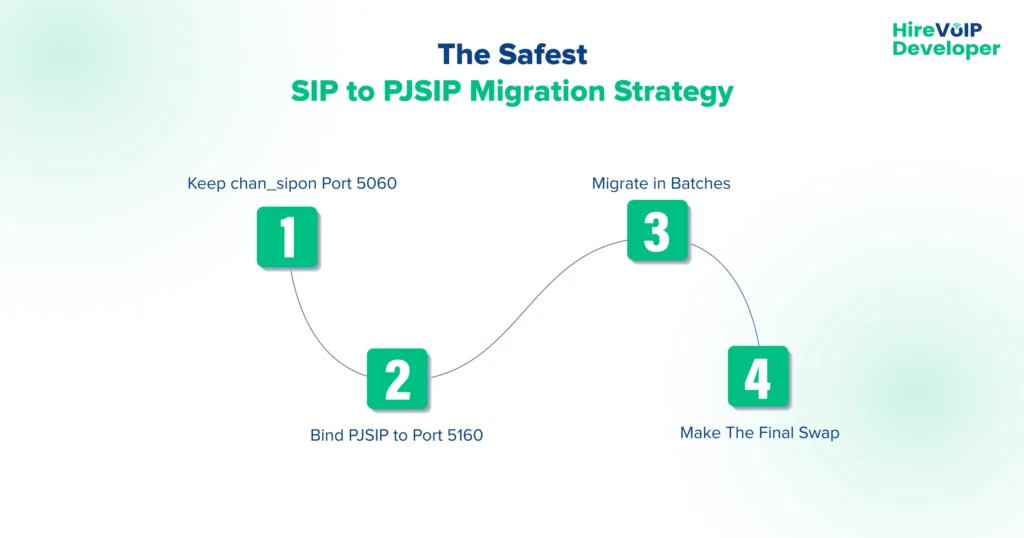
You run both SIP stacks simultaneously on the same core, bound to different network ports. This allows you to migrate tenants or trunk groups individually without affecting the global user base.
-
- Keep
chan_sipon Port 5060: Do not touch your existing endpoints. Let them stay connected to the legacy port. - Bind PJSIP to Port 5160: Configure the new PJSIP stack on an alternate port.
- Migrate in Batches:
- Move a specific tenant in your database to point to the new PJSIP port.
- Validate registration, call routing, and media flow.
- Rollback is instant: If an issue occurs, simply point them back to port 5060.
- The Final Swap: Once all traffic is successfully moved to PJSIP, unload the chan_sip module to release port 5060, then update the PJSIP transport configuration to bind to 5060 and reload or restart the transport module to complete the transition.
- Keep
Scaling Up Using Realtime Databases
A major mistake in enterprise migrations is trying to generate a massive pjsip.conf text file containing thousands of users.
While chan_sip could handle large static files reasonably well, PJSIP’s modular nature means that loading tens of thousands of endpoints from a text file can cause severe delays during a core reload, potentially dropping active calls.
The Solution?
For high-volume deployments, you must use the PJSIP data abstraction layer (Asterisk Realtime Architecture). Instead of writing configuration to text files, you map endpoints directly to a database (MySQL, PostgreSQL). PJSIP fetches endpoint data dynamically only when a call or registration occurs.
This drastically reduces the memory footprint and allows you to provision new customers instantly without ever reloading the telephony engine.
Common SIP to PJSIP Migration Mistakes to Avoid
The most common reasons for migration failure revolve around syntax strictness and architectural differences. Here are the top mistakes to watch out for:
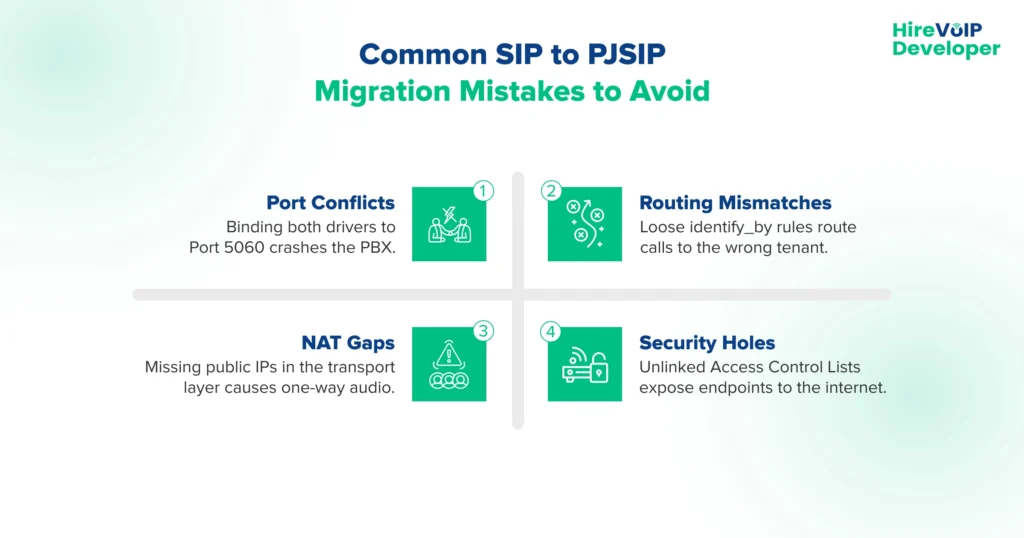
1. The Port 5060 “Address in Use” Crash
Attempting to start the new PJSIP service while the legacy chan_sip driver is still bound to the default port (5060) will cause the PJSIP transport module to fail to bind, resulting in an “Address already in use” error during module initialization with an “Address already in use” error.
Since both drivers cannot listen on the exact same interface simultaneously, you must explicitly configure the PJSIP transport section to bind to an alternate port, such as bind=0.0.0.0:5160, before starting the service during your dual-stack migration phase.
2. Mixing Up the identify_by Logic
While chan_sip was lenient and would loosely match incoming calls, PJSIP relies on extremely strict identification rules. If you have multiple trunks originating from the same provider IP address, PJSIP follows a defined endpoint identification order (configured via endpoint_identifier_order), and improper configuration can result in calls being matched to an unintended endpoint. If the logic isn’t clearly defined, routing calls to the wrong tenant or context.
To fix this and ensure accurate routing, you must explicitly set identify_by=username for dynamic endpoints like IP phones, and identify_by=ip for static provider trunks.
3. The NAT Configuration “One-Way Audio” Gap
Assuming that the legacy nat=yes setting translates directly to PJSIP often results in phones registering correctly but experiencing strict one-way audio. In addition to defining local_net and external_media_address, proper NAT traversal often requires endpoint-level options such as rewrite_contact=yes, rtp_symmetric=yes, and force_rport=yes to ensure correct signaling and media flow. This means you must define your local_net (internal subnet) and external_media_address (public IP) in your configuration.
Without these transport definitions, the system may advertise its private IP address in the SIP SDP packet, causing the remote carrier to drop the audio stream.
4. The ACL (Access Control List) Security Hole
In legacy setups, security rules like permit and deny were often placed in the general section and applied globally, but PJSIP handles security with much stricter modularity. Access Control Lists must be defined in dedicated ACL sections and then explicitly linked to each specific endpoint in your configuration.
If you migrate endpoints without linking these ACLs, your new PJSIP endpoints may be inadvertently exposed to the public internet, creating a massive security vulnerability.
Why Automated Migration Scripts Fail at Scale
There are automated scripts available (like sip_to_pjsip.py) that claim to convert your legacy configuration. While useful as a starting reference, they should be treated as baseline conversion tools and carefully validated before being deployed in production environments.
The Limitations:
- Raw Output: These scripts generate verbose, raw PJSIP configurations. Since PJSIP splits a single device into an Endpoint, AOR, and Auth section, a 10-line legacy config becomes 40 lines. Multiplying this by thousands of users creates unmanageable technical debt.
- Logic Gaps: Scripts cannot intelligently translate complex, custom NAT traversal rules or multi-tenant database logic.
The Carrier Approach:
Service providers should leverage AI and custom tooling to generate “Migration Templates.” Instead of a 1-to-1 conversion, map your users into classes (e.g., “Class A: NAT Enabled”, “Class B: UDP Only”) and use PJSIP Wizards (pjsip_wizard.conf). This utilizes inheritance, reducing thousands of lines of configuration into clean, manageable templates or direct SQL insert statements for your Realtime database.
Real-Time Monitoring During Migration
You cannot rely on customer complaints to verify if a batch migration was successful. You must actively monitor the control and media planes.
What to watch:
- Registration Floods: A sudden spike in 401 Unauthorized responses indicates that the PJSIP auth section does not match the legacy credentials.
- Codec Mismatches: Watch for 488 Not Acceptable Here errors, which occur if the new endpoint is strictly locked to a codec (like G.729) that the carrier isn’t offering.
- Taskprocessor Queues: Monitor the PJSIP thread pool queues. If the queue depth continually rises, your server is experiencing “Thread Starvation,” and you must tune your
threadpool_initial_size.
Command-line packet sniffers like sngrep are non-negotiable for visualizing SIP ladder diagrams in real-time. For carrier-wide observability, integrate Homer (SIPCAPTURE) using the res_hep module to capture and analyze PJSIP traffic globally without impacting server performance.
💡 Expert Tip
In chan_sip, a “Peer” was a monolithic entity containing auth, location, and codec settings. PJSIP separates these concepts.
The biggest advantage here is the AOR (Address of Record) max_contacts setting.
By setting max_contacts to a number greater than 1, you can allow a user to register their physical desk phone and their mobile softphone to the exact same extension simultaneously, without writing complex ring-group logic in the dialplan.
Migrating from SIP to PJSIP is mandatory, but it shouldn’t be viewed solely as a burden. It is an opportunity to pay down technical debt.
By moving from static files to Realtime Database integration, cleaning up your NAT logic, and implementing a proper threading model, you aren’t just “updating drivers”; you are upgrading the capacity, security, and resilience of your entire voice network.
Is your migration strategy carrier-grade? Contact our SIP architects!