


📝 Blog Summary
Configuring Asterisk PJSIP means moving away from single, messy config files to a modular architecture. Instead of blending credentials, sockets, and routing together, Asterisk PJSIP configuration (res_pjsip) separates network transports, endpoint identities, contacts, and auth rules into dedicated blocks.
Because Asterisk removed legacy chan_sip in version 21, mastering PJSIP is essential for Asterisk 20 LTS, 22, and 23. This guide lays out the battle-tested configuration blueprints, covers WebRTC and ITSP trunking, and details vital security hardening.
An Asterisk PJSIP configuration sets up the network sockets, user extensions, upstream trunks, and media routing rules inside /etc/asterisk/pjsip.conf through the modular res_pjsip SIP engine.
For well over a decade, setting up an extension on Asterisk was easy: open chan_sip.conf, create [1001], set type=friend, add a password, and call it a day.
It worked, but that simplicity came with a massive architectural debt. The old channel driver handled everything (socket listening, user authentication, NAT rewriting, and media bridging) inside a single, monolithic loop. When call traffic spiked or an office dealt with registration storms, that single thread locked up, freezing active calls.
With chan_sip officially gone in Asterisk 21, PJSIP (res_pjsip) is the universal standard. It drops the monolithic approach in favor of decoupled, reusable objects.
Whether you are planning a SIP to PJSIP migration strategy or designing an enterprise communications stack from the ground up as outlined in our ultimate guide to Asterisk development, this guide will help you configure it cleanly for production.
What Is PJSIP, and Why Did Asterisk Replace chan_sip?
Asterisk PJSIP is a modern, modular SIP protocol stack written in C. Digium (now Sangoma) integrated it into Asterisk as res_pjsip to replace the fragile, single-threaded chan_sip driver with an architecture built for high concurrency and modern RFC standards.
The switch from chan_sip to res_pjsip solves four major operational pain points:
- Independent Thread Pooling: In chan_sip, a single thread processed incoming network packets. If it choked, the whole PBX felt it. PJSIP uses a dynamic thread pool that spreads SIP parsing across all available CPU cores.
- Decoupled Configuration: Network interfaces, credentials, physical contact locations, and media profiles live in separate blocks. You can point a dozen different endpoints to a single network transport without repeating socket settings.
- Multiple Devices per Extension: With chan_sip, registering a desk phone and a mobile app to the same extension meant building hacky dialplan workarounds. PJSIP Address of Record (AOR) sections handle multi-device registration natively.
- Native WebRTC Integration: WebSockets (ws://, wss://), DTLS-SRTP, ICE, and dynamic STUN handling run directly in the core stack without external patches or complex third-party wrappers.
What Are the Core PJSIP Configuration Object Types and How Do They Relate?
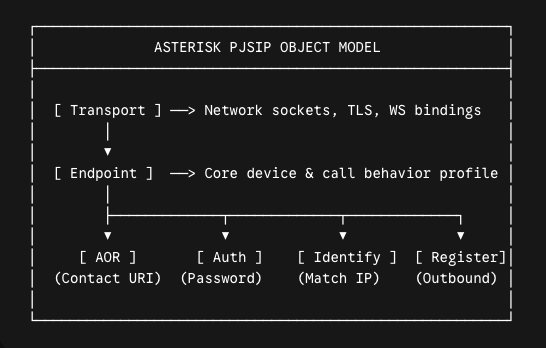
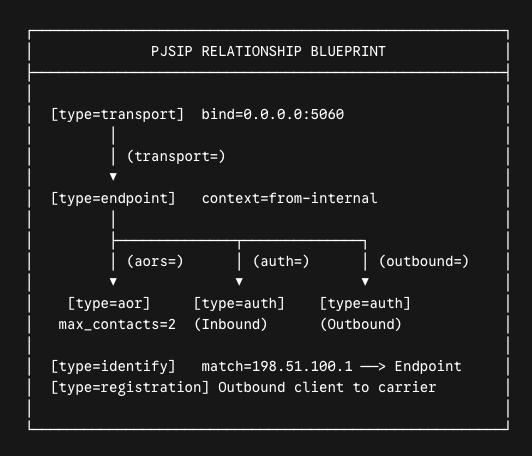
An Asterisk PJSIP configuration inside pjsip.conf uses six core building blocks: transport, endpoint, aor, auth, identify, and registration.
Understanding how these objects snap together makes building and troubleshooting your dialplan straightforward.
1. [transport]
This sets up the network socket. It dictates the local IP, port, protocol (UDP, TCP, TLS, or WebSocket), QoS DSCP markings, and SSL/TLS certificate paths. Transports are system-level objects shared across multiple phones and trunks.
2. [endpoint]
The central profile for a phone, gateway, or trunk. It defines how a call behaves: which audio codecs are allowed, the dialplan context, NAT handling flags, DTMF signaling, and encryption rules. It does not store passwords or IP addresses directly; it references other sections:
- transport= points to the network transport.
- aors= points to the Address of Record object defining where the device lives.
- auth= points to incoming authentication credentials.
- outbound_auth= points to the credentials Asterisk sends when an upstream carrier challenges an outbound call.
3. [aor] (Address of Record)
Tells Asterisk where to send an invite for an endpoint.
- For phones that register dynamically, it controls max_contacts (how many physical phones can register to the extension) and qualify pings.
- For static SIP trunks, it holds the static contact= URI pointing to your provider’s IP or domain.
4. [auth]
Stores authentication credentials. It defines the username, password (or MD5 secret), and auth_type=userpass. Isolating credentials lets you share or separate auth profiles without touching endpoint routing.
5. [identify]
Maps incoming unauthenticated SIP requests to a specific endpoint based on the source IP or subnet. This is mandatory for external SIP trunks that authenticate via static IP addresses instead of username/password challenges.
6. [registration]
Tells Asterisk to register out to an external provider as a client. It stores the carrier’s outbound server URI, client credentials, and refresh intervals.
Also Read: Asterisk Development Explained for People Tired of Confusing VoIP Guides
3 Production Asterisk PJSIP Configuration Examples
The pjsip.conf file lives in /etc/asterisk/pjsip.conf. Here are three ready-to-use configurations covering internal phones, ITSP carrier trunks, and secure WebRTC browser clients.
Example 1: Basic Internal SIP Phone (Dynamic Registration)
This configuration handles a standard office phone (Extension 1001) that registers dynamically, complete with dual-device registration for a desk phone and a mobile app.
; ====================================================================
; 1. Network Transport
; ====================================================================
[transport-udp]
type=transport
protocol=udp
bind=0.0.0.0:5060
local_net=192.168.1.0/24
local_net=10.0.0.0/16
tos=ef
cos=5

; ====================================================================
; 2. Extension 1001 Components
; ====================================================================
[1001-auth]
type=auth
auth_type=userpass
username=1001
password=SuperSecretPass4891!

[1001-aor]
type=aor
max_contacts=2              	; Desk phone AND mobile softphone
remove_existing=yes         	; Drops oldest registration if limit is reached
qualify_frequency=30        	; Keeps NAT pinhole open with OPTIONS pings

[1001]
type=endpoint
context=from-internal       	; Dialplan context in extensions.conf
transport=transport-udp
auth=1001-auth
aors=1001-aor
disallow=all
allow=ulaw
allow=alaw
allow=opus
dtmf_mode=rfc4733
direct_media=no             	; Anchor media in Asterisk for call stability
force_rport=yes             	; Respect real external source ports
rewrite_contact=yes         	; Overwrite contact headers behind NAT
rtp_symmetric=yes           	; Send media back to the packet source IP/port
Example 2: External ITSP SIP Trunk (Registration & IP Matching)
Connecting your PBX to an external telecom provider requires handling outbound registration, responding to carrier auth challenges, and matching incoming calls by IP.
; ====================================================================
; 1. Outbound Carrier Registration
; ====================================================================
[my-itsp-reg]
type=registration
outbound_auth=my-itsp-auth
server_uri=sip:sip.carrier.com
client_uri=sip:ACCOUNT_NUM@sip.carrier.com
contact_user=ACCOUNT_NUM
retry_interval=60
forbidden_retry_interval=300
expiration=3600

; ====================================================================
; 2. Carrier Credentials
; ====================================================================
[my-itsp-auth]
type=auth
auth_type=userpass
username=ACCOUNT_NUM
password=CarrierPassword987!

; ====================================================================
; 3. Static Address of Record for Outbound Calls
; ====================================================================
[my-itsp-aor]
type=aor
contact=sip:sip.carrier.com:5060
qualify_frequency=60

; ====================================================================
; 4. Trunk Endpoint Profile
; ====================================================================
[my-itsp-trunk]
type=endpoint
context=from-pstn
transport=transport-udp
disallow=all
allow=ulaw
outbound_auth=my-itsp-auth
aors=my-itsp-aor
dtmf_mode=rfc4733
direct_media=no
force_rport=yes
rewrite_contact=yes
rtp_symmetric=yes
send_rpid=yes
send_pai=yes
from_user=ACCOUNT_NUM
from_domain=sip.carrier.com

; ====================================================================
; 5. Inbound IP Matching
; ====================================================================
[my-itsp-identify]
type=identify
endpoint=my-itsp-trunk
match=198.51.100.10         	; Primary signaling IP
match=198.51.100.11         	; Secondary backup IP
Example 3: WebRTC Browser Endpoint (WSS, DTLS-SRTP & ICE)
WebRTC clients require secure WebSockets, DTLS handshake certificates, encrypted SRTP audio, and ICE candidate negotiation.
; ====================================================================
; 1. Secure WebSocket Transport
; ====================================================================
[transport-wss]
type=transport
protocol=wss
bind=0.0.0.0:8089
cert_file=/etc/asterisk/keys/asterisk.crt
priv_key_file=/etc/asterisk/keys/asterisk.key
method=tlsv1_2

; ====================================================================
; 2. WebRTC Extension 2001
; ====================================================================
[2001-auth]
type=auth
auth_type=userpass
username=2001
password=BrowserRTCSecretKey2026!

[2001-aor]
type=aor
max_contacts=1
remove_existing=yes

[2001]
type=endpoint
context=from-internal
transport=transport-wss
auth=2001-auth
aors=2001-aor
dtmf_mode=rfc4733
disallow=all
allow=opus
allow=ulaw

; WebRTC Encryption and Traversal Settings
webrtc=yes                  	; Turns on rtcp_mux, use_avpf, and bundle
dtls_auto_generate_cert=no
dtls_cert_file=/etc/asterisk/keys/asterisk.crt
dtls_private_key=/etc/asterisk/keys/asterisk.key
dtls_setup=actpass
media_encryption=dtls
ice_support=yes
direct_media=no
force_rport=yes
rewrite_contact=yes
rtp_symmetric=yes
How to Configure PJSIP for Clean NAT Traversal?
NAT issues happen because traditional SIP messages advertise private IP addresses inside their payload data. When a remote phone on another network tries to return audio, it sends voice packets to an unreachable internal subnet (like 192.168.1.50), creating silence or instant drops.
Fixing this requires configuring both the transport and the endpoint levels:
1. Transport-Level Public IP Declarations
If Asterisk runs on a cloud server behind a virtual firewall (such as AWS EC2 or an on-prem 1:1 NAT router), the transport must declare its public IP:
[transport-udp]
type=transport
protocol=udp
bind=0.0.0.0:5060
local_net=192.168.0.0/16    	; Local office LAN
local_net=10.0.0.0/8        	; Internal VPN subnet
external_media_address=203.0.113.25	; Public Elastic IP
external_signaling_address=203.0.113.25
2. The Four Vital Endpoint NAT Directives
Make sure every endpoint talking across the internet includes these four parameters:
[remote-phone]
type=endpoint
...
rtp_symmetric=yes	; Send audio back to the source IP/port the packet came from
force_rport=yes  	; Ignore Via header port; reply directly to the source port
rewrite_contact=yes  ; Overwrite Contact header with actual received public IP/port
direct_media=no  	; Anchor media in Asterisk to prevent broken peer-to-peer paths
The PJSIP Reload Trap (pjsip reload vs. core restart)
A classic trap for VoIP admins is tweaking a transport’s IP or port, typing pjsip reload, and finding that Asterisk continues running the old settings.
The underlying PJSIP C-library binds directly to operating system sockets. Tearing down and rebuilding an active network socket on a live server risks severing active media streams and crashing active worker threads.
Here is what Asterisk touches under each command:
While you can add allow_reload=yes to a transport block, doing so on a live system will immediately drop every active call riding that socket when reloaded. Keep allow_reload=no on production boxes and schedule transport modifications during maintenance windows.
Cutting Repetition With PJSIP Templates and Wizards
Writing separate auth, aor, and endpoint blocks for hundreds of extensions leads to bloated, unmaintainable configuration files. Asterisk solves this with configuration templates and the PJSIP Configuration Wizard.
1. Native Configuration Templates
Templates let you define common phone settings once and inherit them across individual user profiles using the (!) syntax:
; ====================================================================
; Reusable Templates
; ====================================================================
[endpoint-template](!)
type=endpoint
context=from-internal
transport=transport-udp
disallow=all
allow=ulaw
allow=opus
dtmf_mode=rfc4733
direct_media=no
force_rport=yes
rewrite_contact=yes
rtp_symmetric=yes

[aor-template](!)
type=aor
max_contacts=2
remove_existing=yes
qualify_frequency=30

; ====================================================================
; Concrete Extensions
; ====================================================================
[1001-auth]
type=auth
auth_type=userpass
username=1001
password=HardenedPassword1001!

[1001-aor](aor-template)

[1001](endpoint-template)
auth=1001-auth
aors=1001-aor
2. The PJSIP Configuration Wizard (pjsip_wizard.conf)
For even leaner setups, the res_pjsip_config_wizard automatically generates the endpoint, AOR, and auth objects from a single combined block:
; In /etc/asterisk/pjsip_wizard.conf:
[user-template](!)
type=user
accepts_registrations=yes
accepts_auth=yes
endpoint/context=from-internal
endpoint/disallow=all
endpoint/allow=ulaw,opus
endpoint/dtmf_mode=rfc4733
endpoint/rtp_symmetric=yes
endpoint/force_rport=yes
endpoint/rewrite_contact=yes
aor/max_contacts=2
aor/qualify_frequency=30

[1001](user-template)
inbound_auth/username=1001
inbound_auth/password=HardenedPassword1001!
Asterisk PJSIP Production Security Hardening & Performance Best Practices
Putting a VoIP PBX on a public IP without strict PBX security controls will result in toll fraud attempts within hours. Secure your system using these proven production steps:
1. Disable Anonymous Inbound SIP
Ensure unauthenticated internet traffic cannot hit internal extension contexts. Check your pjsip.conf global settings:
[global]
type=global
default_outbound_endpoint=default_outbound_endpoint
endpoint_identifier_order=ip,username,anonymous ; Check IP and Username FIRST
Never create an [anonymous] endpoint linked to an internal or outbound dialplan context.
2. Lock Down Endpoint Identification (identify_by)
By default, Asterisk searches for endpoints using multiple methods. For internal user phones, restrict identification strictly to username:
[1001]
type=endpoint
...
identify_by=username,auth_username

For IP-authenticated SIP trunks that do not use passwords,
restrict matching exclusively to IP:

[my-itsp-trunk]
type=endpoint
...
identify_by=ip
3. Bind Endpoints with Access Control Lists (ACL)
Prevent stolen extension passwords from being used off-site by binding internal phones to your trusted corporate subnet:
[office-acl]
type=acl
permit=192.168.1.0/24
permit=203.0.113.50/32
deny=0.0.0.0/0

[1001]
type=endpoint
...
acl=office-acl
4. Deploy Fail2Ban on Asterisk Security Logs
Configure Asterisk to write security audit events to /var/log/asterisk/security.log. In /etc/asterisk/logger.conf:
[logfiles]
security => security
Pair this with a Fail2Ban filter to automatically ban IP addresses after three failed registration attempts.
💡 VoIP Expert Tip
When employees use mobile softphones, their devices frequently switch between office Wi-Fi and 5G connections.
If max_contacts=1 and remove_existing=no, Asterisk rejects the new connection attempt with a 403 Forbidden error until the old registration timer expires.
Always configure max_contacts=2 (or higher) with remove_existing=yes on dynamic user AORs to allow clean, uninterrupted network handoffs.
Troubleshooting Asterisk PJSIP (CLI Commands and Common Error Fixes)
When phones show as unavailable, or calls fail, use the Asterisk CLI to isolate the breakdown:
Useful PJSIP CLI Diagnostic Commands
# View active endpoints and their registration status
asterisk -rx "pjsip show endpoints"

# Check active IP/port bindings for registered devices
asterisk -rx "pjsip show contacts"

# Check the registration state of outbound carrier trunks
asterisk -rx "pjsip show registrations"

# Verify which IP addresses match to which trunk endpoints
asterisk -rx "pjsip show identifies"

# Turn on full packet-level SIP tracing in the console
asterisk -rx "pjsip set logger on"

# Turn off SIP tracing
asterisk -rx "pjsip set logger off"
Common Asterisk PJSIP Configuration Errors and Solutions
- Phone Shows “Unavailable”: Run pjsip show contacts. If the contact is missing, verify the device’s network path and ensure qualify_frequency=30 is set in the [aor] section.
- SIP 401 / 403 Forbidden: The password sent by the client does not match the secret in the [auth] section, or the endpoint’s auth= directive points to a nonexistent auth block.
- SIP 488 Not Acceptable Here: The endpoint and Asterisk cannot agree on a common audio codec. Verify that the allow= list in your endpoint configuration contains at least one codec supported by the client.
- One-Way Audio: The PBX or client is sending private IP addresses in SDP media packets. Add external_media_address to your transport and confirm that rtp_symmetric=yes and force_rport=yes are present on the endpoint.
- Calls Drop at 30 Seconds: The edge firewall is closing the UDP NAT pinhole prematurely. Disable SIP ALG on your router and set qualify_frequency=25 on the phone’s AOR.
- “No Matching Endpoint Found” on Inbound Trunk Calls: Asterisk cannot match the incoming carrier call. Ensure you have an [identify] section matching the carrier’s exact signaling IP addresses to the trunk endpoint.
In a clean lab on your local subnet, almost any SIP stack looks solid. The wheels come off when your Asterisk box meets the public internet: hundreds of remote softphones switching from office Wi-Fi to 5G, NAT routers silently dropping UDP states at the 30-second mark, and malicious botnets hammering port 5060 with register floods.
The difference between a PBX that locks up on Monday morning and one that handles thousands of concurrent calls without a hiccup isn’t luck. It comes down to getting the mechanics right:
- Decoupling endpoints from monolithic bindings
- Anchoring media to bypass bad NAT paths
- Tuning OS-level worker threadpools so audio never queues behind signaling
If you’re running Asterisk at scale, moving off legacy chan_sip, or engineering custom WebRTC pipelines, you don’t have to troubleshoot packet dumps and thread deadlocks in the dark.
At Hire VoIP Developer, we build, harden, and rescue carrier-grade VoIP infrastructure for companies that can’t afford dropped calls.
Bring in a senior Asterisk developer to audit, stabilize, or scale your switch!