


📝 Blog Summary
When hosted PBX calls start dropping, the knee-jerk reaction is to spin up more virtual machines. But it almost never works.
Why? Because VoIP scaling is rarely a compute (CPU/RAM) problem, it is a state, network, and database I/O problem.
This blog tears down exactly why brute-forcing your infrastructure fails, the technical reality of SIP vs. RTP bottlenecks, and how to permanently re-architect your PBX stack to handle massive concurrent call volume without breaking a sweat.
It’s 10:02 AM on a Monday.
Your entire customer base (thousands of remote workers, sales dialers, and support agents) logs in and starts making calls simultaneously. Suddenly, the NOC (Network Operations Center) board lights up. Customer support tickets flood in complaining of one-way audio, dead air, and instant call drops.
Your lead engineer panics, opens AWS, and immediately spins up three more high-compute PBX instances. You add them to the load balancer pool. You wait for the green lights.
But the VoIP call drops during peak hours don’t stop. In fact, they get slightly worse.
Why? Because you just tried to solve a plumbing problem by buying more sinks.
There is a dangerous myth in the telecom industry that hosted PBX scaling problems can be solved with horizontal autoscaling. That works for web servers rendering HTML. But it is a catastrophic failure strategy for real-time communications. VoIP solutions are synchronous, stateful, and dual-protocol beasts.
If you are a UCaaS provider or a telecom architect banging your head against the wall, wondering, “Why do hosted PBX calls drop?” when your server CPU is only sitting at 15%, you are in the right place.
Let’s dissect the anatomy of a failure, look at the specific choke points in Asterisk and FreeSWITCH, and build an infrastructure that actually scales.
🔎 Autopsy of a Dropped Call
Let’s look at the exact timeline of a failed call during a peak-hour traffic spike.
- Start of Call:Tenant A initiates an outbound call. The SIP INVITE hits your load balancer.
- 100 Milliseconds Later: The load balancer, seeing your newly added servers, randomly assigns the call to Server #4. Server #4 processes the SIP signaling perfectly. Its CPU is happy. Its RAM is happy.
- 200 Milliseconds Later:The called party picks up the phone. A SIP 200 OK message is sent back. It is now time to open the audio path (RTP).
- 200 Milliseconds Later:The called party picks up the phone. A SIP 200 OK message is sent back. It is now time to open the audio path (RTP).
- 205 Milliseconds Later (The Problem):Server #4 attempts to open a UDP port for the audio stream. But Server #4 shares a NAT gateway and firewall with Servers 1, 2, and 3.
- 210 Milliseconds Later:The port allocation is silently rejected by the firewall. No error is sent back to the PBX.
- 5 Seconds Later:The PBX waits patiently for RTP audio packets to arrive. None do. The caller hears dead air.
- 30 Seconds Later:The PBX triggers a SIP Session Timer timeout. It assumes the network died, kills the call with a BYE message, and logs a dropped call.
The end result?
The IT team blamed the PBX compute capacity and added more servers. But the actual “problem” was the firewall’s UDP session tracking limit. Adding more servers just added more victims to the exact same choke point.
Does Adding Servers Fix VoIP Call Drops?
Simple answer? No. Adding servers only fixes one specific problem: CPU exhaustion. But in modern VoIP networks, your CPU is rarely the bottleneck.
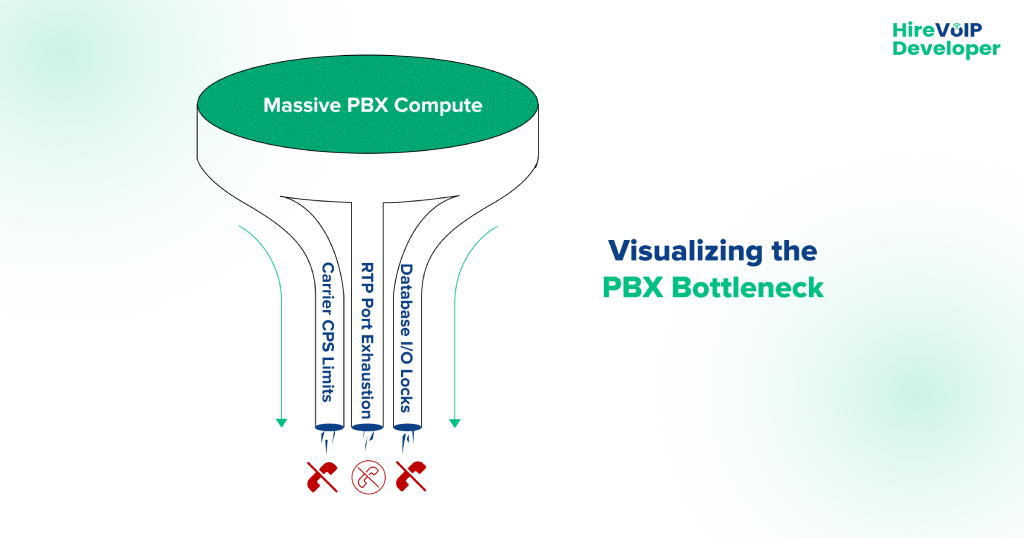
When a hosted PBX fails under load, the root cause almost always lives in the protocol layer or the database layer. Adding a server doesn’t fix a protocol limitation; it simply throws more traffic at a door that is already locked.
Here are the three real reasons your infrastructure is choking.
1. The SIP Trunk Bottleneck (Concurrent Calls vs. CPS)
You might have a massive, clustered PBX capable of handling 20,000 active calls. But your upstream carrier (your SIP trunk provider) has limits on its end.
There is a massive difference between a SIP trunk bottleneck’s concurrent calls limit and a Calls-Per-Second (CPS) limit.
- Concurrent Calls: How many active conversations can happen at once?
- CPS: How many new call setup requests (INVITEs) will the carrier accept within a single second?
At 9:00 AM, thousands of automated dialers start at the exact same time. Your PBX might spit out 150 INVITEs in one second. If your SIP trunk carrier strictly enforces a 50 CPS limit, they will immediately reject the 51st call with a 503 Service Unavailable or simply drop the packet. Your shiny new PBX servers are politely asking to make a call, and the carrier’s network is actively refusing them.
2. RTP Port Exhaustion (The Silent Killer)
As shown in our autopsy above, VoIP uses two protocols. SIP establishes the call (Signaling), and RTP carries the audio (Media).
Every single concurrent call requires a minimum of two UDP ports (one for RTP audio, one for RTCP control data). If a server’s Linux kernel is configured with the default ephemeral port range (net.ipv4.ip_local_port_range = 32768 60999), you only have about 28,000 ports available.
Divide that by two, and a single Linux IP address physically cannot handle more than 14,000 active audio streams, regardless of whether you have 128 cores of CPU. If you hit this limit, the server stays online, the SIP signaling works flawlessly, but the moment the caller says “Hello,” they hear dead air, and the call drops 30 seconds later.
3. I/O Database Locking (The Disk Choke)
Every time a call connects, rings, or disconnects, your PBX has to write a Call Detail Record (CDR) to a database for billing purposes. At the end of peak hour, thousands of calls hang up simultaneously.
If your PBX servers are all trying to write to the same relational database (like PostgreSQL or MySQL), or worse, a localized SQLite file, the database experiences an I/O lock.
When the database locks, the PBX thread that is trying to write the CDR pauses. When the PBX thread pauses, it stops processing new SIP traffic. Your servers aren’t overloaded; they are stuck in a waiting line.
Asterisk and FreeSWITCH (Specific Open-Source Failure Patterns)
If you are running a hosted platform, you are likely using Asterisk or FreeSWITCH under the hood. Generic IT troubleshooting guides will tell you to “check your bandwidth.”
Good telecom engineers know better. Both of these incredible open-source engines have highly specific failure modes at scale.
The FreeSWITCH SQLite Trap
FreeSWITCH is an incredibly performant piece of software, but by default, it relies heavily on internal SQLite databases (core.db, sofia.db) to track channel states and SIP registrations.
When you push past a few thousand concurrent calls, the disk I/O required to constantly update these local SQLite files becomes a massive bottleneck. The SIP profiles (sofia) will begin to lag, causing inbound INVITEs to timeout.
💡 Expert Tip
If you want to scale FreeSWITCH gracefully, you must immediately migrate the internal core databases away from physical disk writes.
Move them to an ODBC connected to an external PostgreSQL cluster, or run them entirely in memory (RAM disk). Moving core.db to a tmpfs RAM disk will instantly eliminate the disk I/O wait times and stop the mysterious morning call drops.
The Asterisk AstDB and Thread Limitations
Asterisk was fundamentally designed as a monolithic PBX, not a distributed cloud architecture. Its internal state engine, the AstDB, is highly localized. If you spin up a second Asterisk server to handle load, Server B has absolutely no idea what is happening on Server A.
Furthermore, if you are still using the legacy chan_sip driver instead of the modern res_pjsip driver, your SIP processing is restricted to a single thread. It doesn’t matter if your server has massive compute resources; chan_sip will only use one thread, maxing out and dropping calls while the rest of your server sits completely idle.
Myth vs. Reality of Scaling a Hosted PBX
Can AI Stop Call Drops in VoIP?
There is a highly technical, highly effective way AI is currently being used to solve hosted PBX scalability solutions: AIOps for Predictive Routing.
Instead of waiting for an Asterisk node’s database to lock up and drop 500 calls, modern AIOps platforms ingest real-time RTCP (RTP Control Protocol) telemetry and SIP retransmission rates.
Machine learning models analyze these micro-metrics (like a 5-millisecond increase in jitter buffer delay or a slight lag in database write speeds) to detect an impending bottleneck.
Seconds before the server actually chokes, the AI hits the API of your edge SIP proxy (Kamailio) and automatically lowers the dispatch routing weight for that specific node. Kamailio quietly stops sending new calls to the struggling server, allowing it to recover without a human NOC engineer ever having to intervene. That is how real telecom AI works.
Real Hosted PBX Scalability Solutions
To stop the drops, you have to stop thinking about “adding servers” and start thinking about decoupling the architecture.
Enterprise-grade hosted PBX scalability solutions rely on splitting the telecom stack into discrete, independently scalable layers. Here is the blueprint.
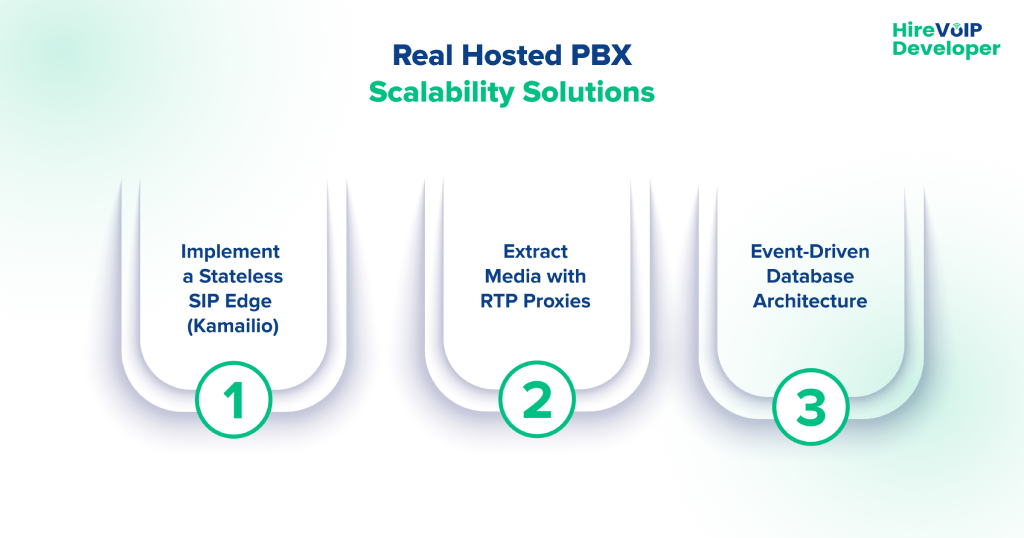
1. Implement a Stateless SIP Edge (Kamailio)
Never expose Asterisk or FreeSWITCH directly to the internet or your carriers. Place a high-speed SIP proxy like Kamailio or OpenSIPS at the edge of your network.
Kamailio is stateless. It doesn’t care about audio; it just routes text-based SIP packets. A single Kamailio node can handle 10,000+ Calls Per Second (CPS).
Kamailio absorbs the massive morning traffic spike, load-balances it intelligently across your internal PBX nodes, and shields your heavy media servers from SIP registration storms.
2. Extract Media with RTP Proxies
To solve the UDP port exhaustion and firewall state table issues, pull the audio processing off your PBX entirely. Deploy a dedicated cluster of RTPEngine or RTPproxy servers alongside your Kamailio edge.
Kamailio routes the signaling to the PBX, but it instructs the RTP proxy to anchor the audio. This keeps your PBX CPU focused entirely on dialplan execution and feature logic, allowing a single node to handle a lot more traffic without dropping a single packet of audio.
3. Event-Driven Database Architecture
Stop letting your PBX write directly to a relational database for billing.
Introduce an event-driven architecture. You need to configure your PBX to fire CDRs and state changes into an ultra-fast, in-memory message broker like Redis or Apache Kafka.
This transaction takes microseconds, meaning your PBX threads never lock up. A separate microservice can then consume those Kafka events and write them safely to your PostgreSQL billing database at its own pace.
If your UCaaS platform is buckling under the weight of its own success, your hardware budget is not the problem. Your architecture is.
Brute-forcing your way through telecom growth by clicking “Add Instance” in your cloud provider’s dashboard is a guaranteed path to unpredictable downtime, furious enterprise clients, and ballooning infrastructure costs.
To permanently eradicate hosted PBX scaling problems, you have to respect the protocol. You must decouple your signaling from your media, transition to high-speed external databases, and protect your edge with carrier-grade load balancers.
Stop guessing why your network is failing at peak hours. Let our experienced VoIP engineers audit your architecture and build a platform that actually scales!