
📝 Blog Summary
The most important aspect of real-time agent assist is decoupling live telephony media streams from asynchronous AI knowledge retrieval loops. This blog will walk you through how to extract raw audio from Asterisk and FreeSWITCH, manage a low-latency budget, redact PII in-flight, and model infrastructure costs across concurrent call legs.
Most contact center software guides explain agent assist with agent productivity and customer satisfaction. Very few cover the actual engineering required to make it work. If you are a CTO, Chief Architect, or Lead Systems Engineer tasked with building a real-time agent assist pipeline, that’s exactly what you should look for.
You need an engineering design document. You need to know how to split a live 16kHz audio stream off a media switch, run speech-to-text without overloading your CPU, strip out sensitive customer data on the fly, query a vector database, and push a relevant suggestion card to an agent’s web desktop (all while the customer is still speaking!).
This blog breaks down the core design patterns required to build a production-grade, real-time agent assist engine from the ground up.
What Is Real-Time Agent Assist in a Contact Center?
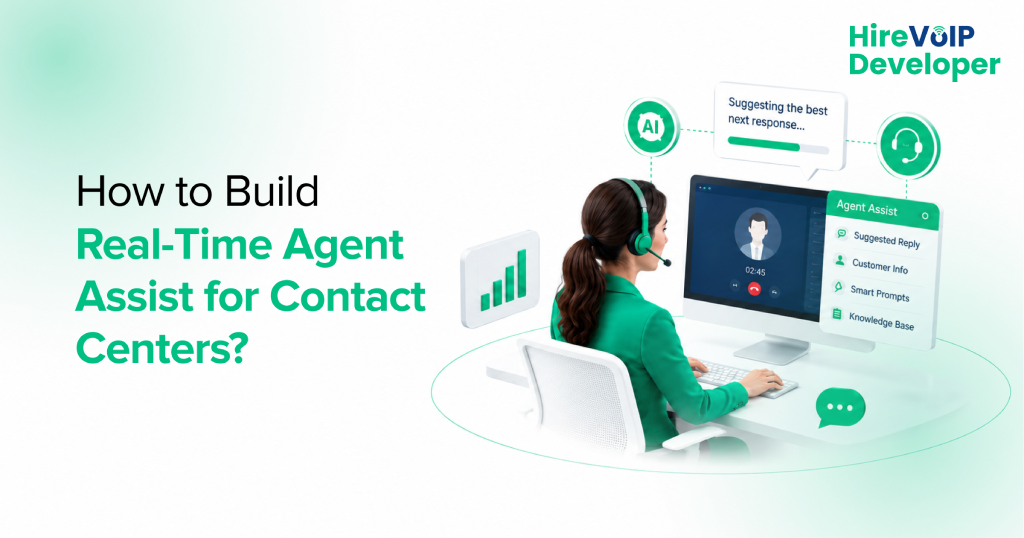
Real-time agent assist is an in-flight software pipeline that passively listens to live call audio, transcribes speech, searches internal knowledge bases, and pushes contextual prompts to the agent’s desktop screen.
Unlike an automated voicebot that takes control of the media plane to talk directly to a customer, an agent assist system operates as a non-blocking, passive observer. It never plays audio back into the call leg.
Instead, it processes the two-way conversation in the background and populates the human agent’s interface with next-best actions, compliance checklists, and verified knowledge-base answers.
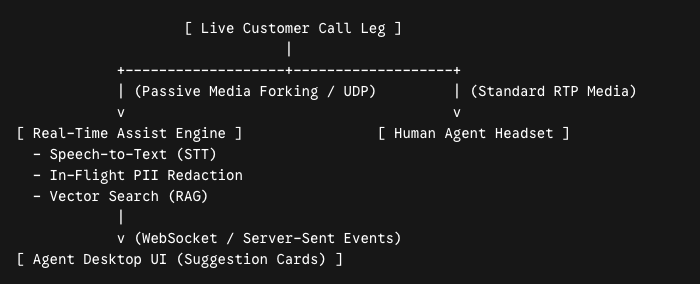
Because the system doesn’t sit directly in the audio playback loop, a minor delay in generating a suggestion card won’t cause awkward silence on the line. However, the system must still run fast enough to deliver recommendations while the current topic is still relevant.
How Does an Agent Assist System Get Access to Live Call Audio?
An agent assist system gets live audio by tapping into the telephony media plane using media-forking protocols like SIPREC, FreeSWITCH mod_audio_fork, or Asterisk AudioSocket. That is how it streams uncompressed PCM audio to a speech engine over WebSockets.
Extracting live media from a private branch exchange (PBX) or session border controller (SBC) requires duplicating the raw Real-time Transport Protocol (RTP) packets without disrupting the primary call bridge. Depending on your core switching layer, you will use one of three primary media-forking mechanics:
1. Asterisk: The AudioSocket Pattern
Asterisk duplicates channel audio using the native AudioSocket application. When a call connects, the dialplan forks the channel media into a two-way or one-way TCP socket connection. Asterisk streams signed linear 16kHz PCM (slin16) mono frames in precise 20-millisecond chunks directly to your external processing container.
<!-- Asterisk Dialplan Audio Ingress -->
<extension name="agent_assist_fork">
  <condition field="destination_number" expression="^queue_routing$">
    <!-- Mirror active channel audio to external assist gateway -->
    <action application="AudioSocket" data="assist-gateway.internal:9092,slin16"/>
    <action application="Queue" data="support_queue"/>
  </condition>
</extension>
2. FreeSWITCH: The mod_audio_fork / mod_audio_stream Pattern
FreeSWITCH taps the active media bug using mod_audio_fork or mod_audio_stream. The module intercepts raw RTP audio frames directly from the channel read/write threads and streams them as binary payloads over a persistent WebSocket connection straight to your streaming Speech-to-Text (STT) service.
3. SBC Level: SIPREC (Session Recording Protocol)
In multi-vendor or legacy contact center environments (utilizing Kamailio, Audiocodes, or Cisco SBCs), media forking is handled at the network border using SIPREC. The SBC acts as a Session Recording Client (SRC), establishing a secondary SIP dialog to send a mirrored copy of the caller and agent audio streams (RTP) to your Agent Assist server, acting as the Session Recording Server (SRS).
Adding Real-Time Agent Assist to Asterisk or FreeSWITCH
You can add real-time agent assist to Asterisk or FreeSWITCH by using native media-forking plugins to mirror incoming RTP streams to an external pipeline without altering existing dialplans.
Because agent assist operates out-of-band, you don’t need to rewrite your primary call routing, queue management, or PBX extensions. The table below outlines how Asterisk and FreeSWITCH handle media extraction, process isolation, and desktop UI streaming:.
Also Learn How to Connect PBX to AI Easily!
You can accelerate your build timeline by partnering with our specialized VoIP developers.
Handling Stereo vs. Dual-Mono Media Streams
To run accurate speech-to-text transcription without crosstalk confusion, your assist engine must isolate the customer’s voice from the agent’s voice on completely separate audio tracks.
If you stream a mixed mono channel (where both speaker voices are merged onto one track) into a streaming speech recognition engine, speaker diarization algorithms will struggle to distinguish who is speaking during over-talk conditions. This causes inaccurate transcripts and triggers irrelevant knowledge searches.
So, when setting up your media plane:
- In FreeSWITCH: Configure mod_audio_fork to stream audio in stereo L16 format, where Channel 0 carries the incoming caller RTP and Channel 1 carries the outgoing agent RTP. Your orchestration middleware splits these binary frames into two discrete WebSocket payloads before hitting your STT engine.
- In Asterisk: Attach AudioSocket independently to both the inbound channel leg and the outbound bridged channel leg, tagging each stream with a unique Channel-ID header to maintain speaker context downstream.
Latency Budget of AI Agent Assist for Call Centers
In live agent assist architectures, latency is the ultimate usability metric. While a voicebot must complete a turn-taking loop in under 600ms, an agent assist pipeline must surface knowledge cards in under 300ms to 500ms to give human agents enough time to scan the information before replying.
In an agent assist pipeline, speech transcription is rarely the main cause of delay. The real performance bottleneck sits inside your Retrieval-Augmented Generation (RAG) loop.
When a customer asks a complex policy question, your system must:
- Convert the live transcript into text embeddings.
- Query a vector database (such as Qdrant, Pinecone, or Pgvector) across thousands of company documents.
- Rerank the top results.
- Pass the context to a fast LLM to generate a summary card.
The recommendation card pops up on the agent’s screen while the customer is still finishing their sentence or while the agent is beginning their initial response, providing helpful context without interrupting the conversation flow.
How to Optimize RAG Retrieval?
To ensure your RAG pipeline returns accurate, actionable suggestions within the 150ms retrieval budget, you must optimize how your internal knowledge base is chunked and indexed.
If your vector store indexes massive, 2,000-token document pages, your LLM will spend too much time parsing fluff, driving up generation latency. Conversely, if your chunks are too small (e.g., 50 tokens), the model loses essential policy context.
Here’s the optimal RAG configuration for live contact centers:
- Chunking Strategy: Split documentation into small, semantic blocks of 200 to 300 tokens with a 50-token overlap. Each chunk must contain a specific, standalone answer (e.g., “Step-by-step procedure for fee waivers”).
- Hybrid Search (BM25 + Dense Vectors): Dense vector embeddings (like OpenAI text-embedding-3-small) capture semantic intent, but often fail on specific product SKUs, policy numbers, or error codes. Combine vector search with a sparse keyword index (BM25) to ensure exact alphanumeric matches are retrieved.
- Reciprocal Rank Fusion (RRF): Pass the top 10 results from both vector and BM25 searches through a fast, lightweight reranking model (such as Cohere Rerank v3-light) to select the top 3 most relevant chunks in under 30 milliseconds.
Pushing Real-Time Agent Assist Suggestions via WebSockets / SSE
Once your RAG pipeline generates a contextual recommendation card, you need an efficient, real-time transport protocol to push that card to the agent’s browser interface.
Relying on traditional HTTP polling (where the agent’s browser queries the server every second for new suggestions) creates unnecessary network congestion and adds up to 1,000ms of artificial UI rendering delay.
Here are your best transport options for desktop delivery:
- Server-Sent Events (SSE): SSE is the optimal protocol for agent assist UI delivery. Because communication is strictly one-way (server-to-browser), SSE provides an ultra-lightweight, persistent HTTP connection that pushes JSON card payloads to the agent’s desktop the millisecond they are generated, consuming far fewer server resources than WebSockets.
- WebSockets (WSS): Use full-duplex WebSockets if your agent UI requires interactive two-way feedback, such as allowing the agent to click “Mark as Helpful” or “Trigger Automated Email”, sending instant telemetry back to the assist daemon.
How to Protect PII in Live Call Transcripts?
You can protect PII (Personally Identifiable Information) in live transcripts by deploying an inline, zero-latency redaction layer that strips credit card numbers, SSNs, and names using regex and local Named Entity Recognition before text hits vector databases or LLMs.
Allowing unredacted live transcripts to flow directly into external vector databases or cloud LLMs creates immediate compliance violations under PCI-DSS, HIPAA, and GDPR. Your ingestion pipeline must sanitize data before it hits your search or storage layers.
1. Structured Data Redaction (Regex Filter)
Structured data (such as 16-digit credit card numbers, 9-digit Social Security Numbers, phone numbers, and PINs) should be scrubbed using ultra-fast, local regular expression (regex) algorithms running inline on the streaming server. This step executes in under 2 milliseconds and replaces sensitive numbers with standardized tokens like [CREDIT_CARD_REDACTED].
2. Unstructured Data Redaction (Local NER Model)
Unstructured data (such as customer names, home addresses, and dates of birth) cannot be reliably caught by regex alone. Your pipeline should pass text through a lightweight, local Named Entity Recognition (NER) model (like SpaCy, RoBERTa-NER, or Microsoft Presidio) running on your local container cluster.
💡Expert Tip
Never send raw customer identities to public cloud LLM endpoints.
Instead, replace recognized customer entities with local session tokens (e.g., replace “John Doe” with [CUSTOMER_ENTITY_1]) inside your local middleware stream.
Maintain a short-lived, encrypted lookup table in a local Redis instance. When the LLM generates a suggestion card containing the token, your desktop frontend swaps the token back to the real customer name locally on the agent’s screen.
This keeps your cloud LLM calls completely anonymous.
Should You Build AI Agent Assist for Call Centers or Buy a Vendor Tool?
You should build custom AI agent assist if your call center has proprietary workflows, strict data sovereignty needs, or high call volume, whereas buying fits small teams with standard SaaS stacks.
Choosing whether to build an internal assist engine or purchase an off-the-shelf SaaS product comes down to workflow flexibility, data privacy control, and total scale cost.
A landmark study published by the National Bureau of Economic Research (NBER) evaluated the deployment of real-time generative AI conversational assistance across 5,000+ contact center agents. The research demonstrated that access to real-time AI agent assist increased overall agent productivity by 14% (measured in issues resolved per hour), with novice and lower-skilled workers showing a massive 34% productivity gain.
To capture these gains with a custom build (without creating vendor lock-in), you must evaluate these required engineering skills:
- Telecom / Media Engineer: Masters low-level RTP audio forking, PJSIP, AudioSocket, and FreeSWITCH ESL socket management.
- Real-Time Systems Engineer: Builds scalable WebSocket orchestration servers, Redis pub/sub pipelines, and event-driven data flows.
- AI / ML Infrastructure Engineer: Tunes streaming STT models, optimizes vector database indexing (Qdrant/Pinecone), and implements fast local NER models.
- Frontend Integration Developer: Embeds lightweight, non-intrusive suggestion cards directly into the contact center agent’s CRM or web desktop interface.
If your team is ready to design a custom assist engine but lacks specialized telecom media plane developers, you can bridge the gap by consulting with our open-source telecom architects!
What Does Real-Time Agent Assist Cost per Concurrent Call?
Self-hosting a custom real-time agent assist pipeline costs approximately $0.015 to $0.025 per active call minute, depending on whether you utilize cloud APIs or self-hosted GPU containers for transcription and LLM inference.
Commercial SaaS vendors typically charge $75 to $150 per agent per month plus per-user feature add-ons. By contrast, a self-hosted or custom-built architecture scales strictly on active compute and API token usage.
The table below breaks down the exact infrastructure cost drivers for a custom real-time agent assist engine operating across 1,000 active concurrent call legs (assuming 60,000 active audio minutes per hour):
So, even factoring in initial engineering and maintenance overhead, building a custom assist engine provides massive total cost of ownership (TCO) savings at scale.
Building a real-time agent assist engine isn’t an AI exercise. It’s a high-concurrency systems engineering challenge. The difference between a system your agents rely on and one they mute within ten minutes comes down to media plane isolation, strict PII tokenization at the edge, and keeping your retrieval loop firmly under 500 milliseconds.
If your core switching stack is dropping frames during audio forking, or your vector database is clogging up under peak call volumes, you don’t need a higher SaaS tier. You need low-level media plane engineering.
Work directly with our open-source telecom architects to build your custom real-time agent assist pipeline!