

In 2011, a live video call required a plugin, a prayer, and about 40 seconds of loading screen optimism.
In 2024, a surgeon in Singapore consults with a specialist in Berlin. A startup founder pitches investors across three time zones simultaneously. A teacher in São Paulo runs a live class for 200 students, all on a browser tab, no download required.
The gap between those two realities has one name: WebRTC.
What started as an open-source project backed by Google became the silent engine behind the world’s most widely used real-time platforms. Today, WebRTC streaming powers everything from enterprise video calls to interactive live events to developer-built SaaS products. The companies that understand it build better, faster, and cheaper than those that don’t.
This guide covers 10 of the best WebRTC live streaming apps, not just what they are, but how they’re architected, who they’re actually built for, and why each one earned its spot on this list. If you’re choosing a WebRTC streaming software stack or evaluating platforms for a product, start here.
If you’re choosing a WebRTC streaming software stack or looking to hire WebRTC developers to build on top of it, start here.
What Is WebRTC and How Does It Work?
WebRTC (Web Real-Time Communication) is an open-source browser technology that enables direct peer-to-peer audio, video, and data transfer without plugins. It uses ICE for NAT traversal, DTLS for encryption, and SRTP for secure media, delivering sub-500ms latency ideal for live streaming and real-time communication.
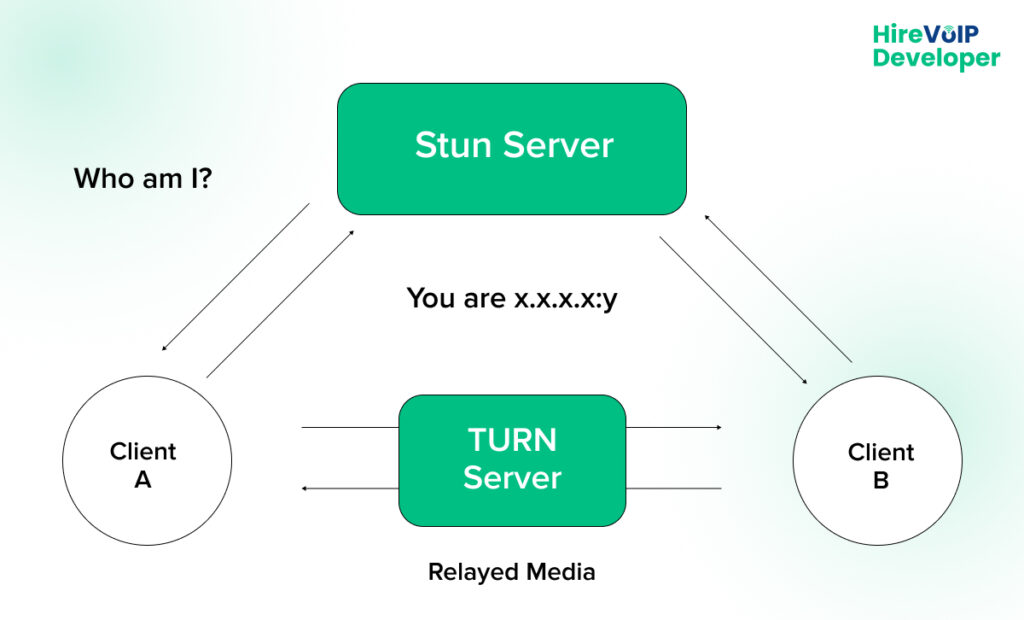
The WebRTC process works in three phases. First, signaling: the two endpoints exchange session metadata (codec preferences, ICE candidates) via a separate signaling channel, usually Web Sockets or SIP. Second, network discovery: ICE (Interactive Connectivity Establishment) tests multiple network paths using STUN and TURN servers to find the best route. Third, media transfer: once connected, audio and video are encrypted via DTLS-SRTP and streamed directly between peers.
For WebRTC broadcasting at scale, pure P2P connections hit limits quickly. That’s where SFU (Selective Forwarding Unit) and MCU (Multipoint Conferencing Unit) architectures come in; more on those in the app breakdowns below. If you’re new to the protocol and want a deeper technical foundation before diving in, this ultimate guide to WebRTC and real-time communication is a solid starting point.
How Do These WebRTC Apps Compare? A Quick Recap
A side-by-side snapshot of all 10 WebRTC-based applications covered in this guide, comparing architecture type, open-source availability, latency profile, and scalability.
Use this table if you need a fast answer before diving into the detailed breakdowns below:
In Terms of Architecture & Open Source
Architecture choices shape everything from cost to flexibility.
Here’s how each app stacks up on its core media-routing model and open-source availability:
In Terms of Latency & Scale
Latency and scalability often pull in opposite directions.
This table shows where each app lands on the spectrum, from ultra-low-latency real-time apps to large-scale broadcasts.
The right WebRTC streaming platform isn’t just about the lowest latency or the biggest scale; it’s about fit. The architecture behind each of these apps, the trade-offs they’ve made, and the specific problems they were built to solve matter far more than any single column in this table. Let’s get into the details.
What are the Top 10 Live Streaming Apps Using WebRTC
Not every WebRTC platform is built for the same job. Some are engineered for developers who want full control over infrastructure. Others are designed for teams that just need to hit “go live” without touching a single config file. The architecture underneath each one, P2P, SFU, MCU, or something proprietary, shapes everything from latency to scale to cost.
The 10 platforms below are the most relevant, actively maintained WebRTC live-streaming tools available today. Each one has been chosen for a specific reason: architectural merit, real-world adoption, or a use case that others on this list don’t cover.
Here’s a closer look at each one, what’s running under the hood, who it’s built for, and why it made the cut:
1. OBS Studio with WebRTC Integration
Architecture: OBS itself is a local capture and encoding tool. WebRTC streaming is added via plugins such as obs-webrtc or via WHIP (WebRTC-HTTP Ingestion Protocol) endpoints. The stream flows from OBS → WHIP ingest server → WebRTC broadcast to viewers.
Best For: Professional broadcasters, game streamers, webinar hosts, and enterprises needing fine-grained production control.
Why It Made This List: OBS is the gold standard for streaming software. Its WebRTC integration via WHIP unlocks sub-second latency broadcasting to custom platforms, something traditional RTMP pipelines cannot achieve. For developers building custom WebRTC live streaming broadcast infrastructure, OBS + WHIP is a powerful ingest point.
With WebRTC integration, OBS enables low-latency streaming for webinars, presentations, and high-quality live events. Advanced controls like multi-scene switching, source layering, and audio mixing make it a top choice for production-grade WebRTC streaming.
2. Jitsi Meet
Architecture: Jitsi uses a Selective Forwarding Unit (SFU) called the Jitsi Videobridge (JVB). Each participant sends their stream to the JVB once; the bridge selectively forwards relevant streams to other participants. This avoids the N×N upload problem of pure P2P mesh.
Best For: Privacy-conscious teams, NGOs, healthcare providers, and developers seeking a self-hosted video conferencing stack.
Why It Made This List: Jitsi is one of the most complete open-source WebRTC-based applications available. Its SFU architecture handles medium-scale calls efficiently, and the entire stack, including Prosody for signaling and Jicofo for conference focus, is open and deployable. For teams that can’t use closed-platform tools for compliance reasons, Jitsi is the go-to WebRTC live streaming solution.
3. Talky
Architecture: Talky uses a pure P2P mesh via WebRTC, with SimpleWebRTC as its underlying library. Signaling is handled through a lightweight WebSocket server. No SFU or MCU, streams go directly from browser to browser.
Best For: Small groups of 2–4 people for casual, low-overhead video calls. Not suited for large meetings or production use.
Why It Made This List: Talky demonstrates WebRTC’s native P2P capability in its simplest form. Its no-account, no-download philosophy makes it a clear example of how WebRTC streaming can be shipped with near-zero infrastructure. Developers evaluating lightweight WebRTC implementations often use Talky as a reference for how simple a functional video chat product can be.
4. BigBlueButton
Architecture: BigBlueButton uses a hybrid SFU + MCU model. Video streams go through Kurento (or mediasoup in newer versions) as the SFU/MCU. Audio is mixed server-side via FreeSWITCH, which handles WebRTC-to-SIP bridging and audio conferencing at scale.
Best For: Online educators, universities, e-learning platforms, and virtual training providers.
Why It Made This List: BigBlueButton’s deep integration with LMS platforms like Moodle and Canvas makes it the dominant open-source WebRTC solution for education. The FreeSWITCH audio backend is especially notable; it gives WebRTC broadcasting enterprise-grade audio mixing that most browser-only stacks can’t match.
5. Google Meet
Architecture: Google Meet uses Google’s proprietary SFU infrastructure backed by globally distributed edge nodes. Streams are relayed through Google’s network for quality optimization, adaptive bitrate switching, and noise cancellation at the infrastructure level.
Best For: Enterprises, remote teams, and organizations deeply integrated in Google Workspace.
Why It Made This List: Google Meet is the benchmark for reliability in WebRTC video streaming at scale. Its browser-first design, no plugin, no download, is a direct result of Google’s heavy investment in WebRTC standardization. Understanding how Google Meet uses WebRTC helps developers benchmark what best-in-class WebRTC live broadcast infrastructure looks like.
6. StreamYard
Architecture: StreamYard uses a cloud-based SFU that ingests WebRTC streams from hosts and guests, processes them server-side (overlays, layouts, branding), and simultaneously re-encodes the output for RTMP delivery to platforms like YouTube, LinkedIn, and Facebook.
Best For: Content creators, marketers, and B2B brands running multi-platform WebRTC live streaming broadcasts.
Why It Made This List: StreamYard solves a real production problem: how do you go live on five platforms at once with professional branding, without a studio? Its WebRTC ingest layer handles the real-time part; the cloud processing layer handles distribution. For teams producing regular WebRTC live-broadcast content, it eliminates weeks of custom infrastructure work.
7. Whereby
Architecture: Whereby starts with P2P WebRTC for small calls and automatically falls back to its own SFU when participant count or network conditions require it. This hybrid approach keeps latency low for small meetings and adds reliability for larger ones.
Best For: Freelancers, small businesses, coaches, and SaaS products that need embeddable video meetings via API.
Why It Made This List: Whereby’s embeddable room API is a standout feature for developers. It lets teams add WebRTC-based video rooms to their own products without building streaming infrastructure from scratch.
8. Zoom (Web Version)
Architecture: Zoom‘s web client uses WebRTC for media capture and transport, routed through Zoom’s proprietary Multimedia Router (MMR), a cluster of SFU nodes deployed globally. Zoom’s infrastructure adds application-layer optimizations, such as packet loss recovery and dynamic codec switching, on top of standard WebRTC.
Best For: Enterprises, large organizations, and anyone needing cross-device compatibility without forcing app installs.
Why It Made This List: The Zoom web client shows how far WebRTC video streaming can be pushed when combined with a well-optimized proprietary media layer. Its scale, millions of concurrent sessions, makes it a reference point for what enterprise-level WebRTC broadcasting infrastructure needs to handle.
9. Daily.co
Architecture: Daily.co operates a global network of SFU nodes with automatic region routing. It exposes WebRTC capabilities through a JavaScript SDK and REST API, abstracting ICE, STUN/TURN, and SFU management entirely from the developer. Supports both client-side SDK and server-side recording.
Best For: Developers building real-time video into SaaS products, telehealth apps, edtech platforms, and customer-facing tools.
Why It Made This List: Daily.co is one of the cleanest developer-focused WebRTC streaming software platforms available. Instead of managing Janus, mediasoup, or Kurento yourself, you get a production-ready WebRTC infrastructure via API. For teams that need sub-500ms WebRTC live streaming without a dedicated media server team, Daily.co is a strong fit, and platforms like this are a good example of how real-time APIs can significantly improve your WebRTC connectivity without requiring deep infrastructure expertise.
10. Agora
Architecture: Agora runs on SD-RTN (Software-Defined Real-Time Network), a purpose-built global network of edge nodes optimized for real-time media routing. Unlike standard WebRTC deployments, Agora’s SD-RTN routes media at the application layer, enabling ultra-low latency even under poor network conditions. Supports WebRTC interoperability through its Gateway SDK.
Best For: Developers building interactive live events, social streaming apps, gaming voice chat, and real-time communication at a global scale.
Why It Made This List: Agora operates at a different performance tier than most WebRTC-based applications on this list. Its SD-RTN delivers sub-100ms latency under ideal conditions, relevant for interactive WebRTC live-streaming scenarios such as live auctions, social commerce, or multiplayer games where standard WebRTC latency isn’t low enough. It’s the right choice when the streaming experience itself is the product.
What this list makes clear is that WebRTC streaming isn’t a one-size-fits-all decision. A solo developer building a telehealth MVP has different needs than an enterprise running global town halls, and both have different needs than a content creator going live on five platforms at once. The right WebRTC-based application is always the one that matches your architecture requirements, your audience size, and the level of control your team can realistically maintain.
The good news? The ecosystem is mature enough that there’s a strong option for almost every scenario. The next step is knowing which one is yours.
Why Choose WebRTC for Live Streaming?
WebRTC is the default choice for live streaming because it delivers sub-500ms latency natively in the browser, no plugins, no downloads, no proprietary clients. Its built-in encryption (DTLS-SRTP), adaptive bitrate, and broad device support make it the foundation for most modern real-time communication products.
Here’s what sets WebRTC apart from traditional streaming protocols like HLS or RTMP:
- Low Latency: Peer-to-peer connections and optimized codec negotiation (VP8, VP9, H.264, AV1) deliver the sub-second performance WebRTC live streaming is known for.
- Browser-Native: Users join directly from Chrome, Firefox, Safari, or Edge, no installs, no plugins, no friction.
- End-to-End Encryption: DTLS for key exchange, SRTP for media, security is built into the protocol, not bolted on.
- Adaptive Bitrate: WebRTC dynamically adjusts stream quality based on available bandwidth, reducing dropped packets and buffering.
- Scalable Architecture Options: From P2P for small calls to SFU/MCU for large WebRTC broadcasting deployments, the protocol supports multiple architectural patterns.
These aren’t just technical checkboxes; they’re the reason WebRTC live streaming has become the default choice for teams that can’t afford lag, dropped connections, or clunky user experiences. When the protocol handles encryption, adaptation, and browser compatibility out of the box, your team gets to focus on building the product rather than maintaining the infrastructure. That’s the real competitive advantage WebRTC puts on the table.
WebRTC Architecture Patterns: P2P vs SFU vs MCU
WebRTC supports three main architecture patterns: P2P (direct browser-to-browser, best for 1:1 or small groups), SFU (streams route through a central server that forwards selectively, best for meetings of 5–50), and MCU (server mixes all streams into one, best for large broadcasts with lower client load).
- P2P (Peer-to-Peer): Each participant sends and receives streams directly from others. Lowest latency, zero server media cost. Breaks down above 4–5 participants due to upload bandwidth constraints.
- SFU (Selective Forwarding Unit): Each participant sends to the SFU once; the server decides which streams to forward to whom. Used by Jitsi, Daily.co, Agora, and most modern WebRTC streaming software, though architecting these systems for 10k+ concurrent users requires a different set of infrastructure decisions than a small-scale deployment.
- MCU (Multipoint Conferencing Unit): The server receives all streams, mixes them into a single composite stream, and sends it to participants. High server cost but low client bandwidth. Common in WebRTC broadcasting for large audiences.
Choosing the wrong architecture for your scale is one of the most common and costly mistakes in WebRTC streaming development. A P2P setup that works perfectly in a 3-person demo will fall apart in a 20-person product launch. An MCU that handles a 500-person broadcast will burn through server costs for a small team standup. The architecture isn’t a backend detail; it’s a product decision. Get it right early, and everything built on top of it becomes easier to scale, optimize, and maintain.
In a Nutshell
WebRTC live streaming has come a long way from a browser experiment to the backbone of how the world communicates in real time. The 10 platforms covered in this guide represent the best of what the ecosystem has to offer today, each making distinct architectural choices that reflect distinct priorities around latency, scale, openness, and developer experience. There’s no universal winner. There’s only the right fit for your specific use case, your team’s technical capacity, and the experience you want to deliver to your users.
If you’re still weighing options or realize that none of the off-the-shelf platforms quite match what you’re building, that’s usually the signal that a custom WebRTC streaming solution is the right path. At Hire VoIP Developer, we’ve helped businesses across industries design and deploy production-grade WebRTC-based applications, from architecture decisions and media server setup to full-scale platform development. Whether you’re starting from scratch or scaling what you already have, the right expertise makes all the difference.
Real-time communication is no longer a feature. It’s an expectation. Build it right. Get in touch today!