


📝 Blog Summary
Many organizations adopt UCaaS to simplify communications, but few understand the architecture that keeps voice, video, messaging, and collaboration services running reliably at scale.
This blog explores the core layers, components, and traffic flows behind modern UCaaS platforms.
Read on to learn how signaling, media, SBCs, and deployment models shape performance, scalability, and reliability.
Ask anyone where their UCaaS platform actually lives, and the answer is usually some version of “the cloud.”
Press a little harder. Which cloud? Where’s the media server? Where do the SIP signaling decisions happen? Who’s handling the recording storage, you, AWS, or a third party nobody named?
“It’s all in the cloud” is what people say when they haven’t looked at the architecture. It’s also the answer that creates the most problems when systems need to scale, meet compliance requirements, or recover from failures.
As unified communication systems are optimizing customer experience across voice, video, messaging, and collaboration channels, the underlying architecture matters more than ever.
The rise of AI-powered communications is adding another layer of complexity. Features such as voice bots, real-time transcription, conversation analytics, and intelligent routing depend on a UCaaS architecture that can support low-latency media processing and scalable data flows.
Understanding how the signaling, media, application, and data layers connect helps teams make better decisions around performance, security, and scalability.
This guide explains UCaaS architecture, its key components, and the layers that support modern cloud communications.
What is UCaaS Architecture?
UCaaS architecture is the underlying framework that enables cloud-based voice, video, messaging, meetings, and collaboration services to operate as a unified platform. It defines how users, applications, networks, and communication services interact to deliver real-time communication experiences.
As organizations focus on modernizing and customizing UCaaS environments, understanding the underlying architecture becomes increasingly important.
A typical UCaaS architecture includes multiple layers for user access, application services, signaling, media processing, and data management.
Together, these layers handle everything from user authentication and call routing to media delivery and storage.
The architecture determines how communication sessions are established, how media flows between users, and how services remain available as demand grows.
UCaaS Architecture vs Deployment Models
UCaaS architecture and deployment models are often used interchangeably, but they represent different concepts.
UCaaS Architecture – Refers to the technical foundation of the platform. This includes the signaling layer, media layer, application services, databases, and security components.
Deployment Model – Defines how that architecture is delivered to customers. The same underlying UCaaS architecture can support different deployment approaches based on business and operational requirements.
Single-Tenant, Multi-Tenant, and Hybrid Deployments
In a single-tenant deployment, each customer operates within a dedicated environment. This provides greater control, customization, and isolation.
In a multi-tenant deployment, multiple customers share the same infrastructure while maintaining logical separation. This model improves resource efficiency and simplifies management.
A hybrid deployment combines elements of both approaches. Organizations can keep specific workloads in dedicated environments while using shared infrastructure for other services.
Regardless of the deployment model, the core UCaaS architecture remains responsible for delivering secure, scalable, and reliable communications.
The real structure of a UCaaS platform emerges when its layers are broken down.
What Are the Core Layers of a UCaaS Architecture?
A typical UCaaS architecture consists of five core layers that work together to support communication services. Understanding these layers is essential for secure UCaaS development and long-term platform scalability.
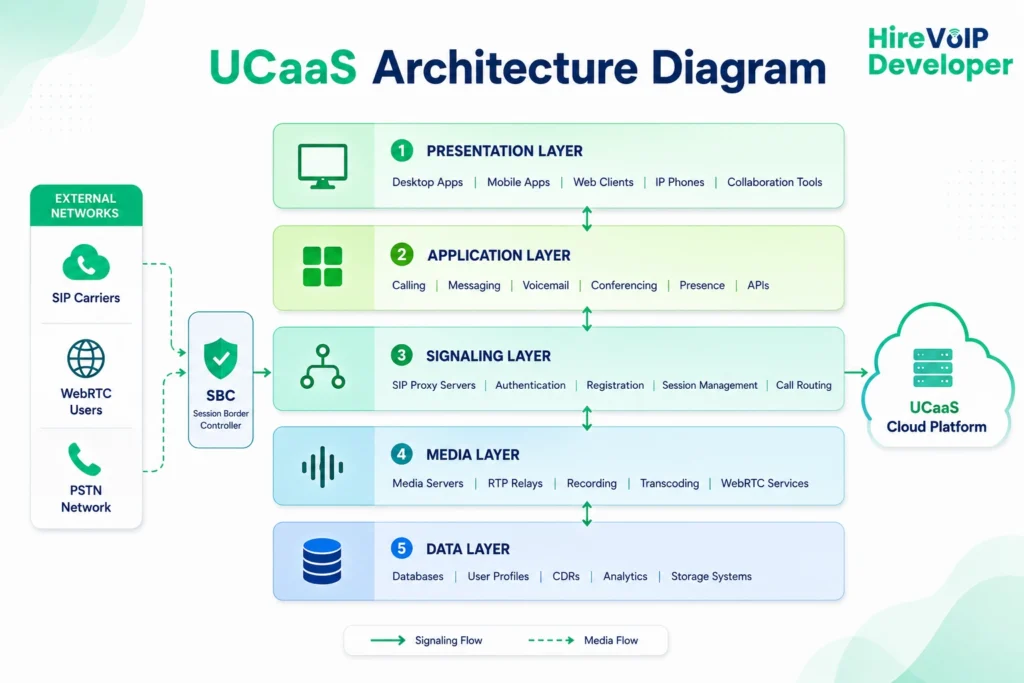
1. Presentation Layer
The presentation layer is the user-facing part of the platform. It includes desktop applications, mobile apps, web clients, IP phones, and collaboration interfaces.
This layer allows users to access communication services from any supported device.
2. Application Layer
The application layer delivers communication features and business logic. It manages services such as calling, messaging, voicemail, conferencing, presence, and user provisioning.
This layer also supports integrations with third-party applications and business systems.
3. Signaling Layer
The signaling layer controls how communication sessions are established and managed. It handles user registration, authentication, call setup, routing decisions, and session termination.
Most UCaaS platforms rely on SIP-based signaling to coordinate communication between endpoints.
4. Media Layer
The media layer processes and transports real-time audio and video streams. It manages conferencing, transcoding, recording, media routing, and RTP traffic exchange.
This layer directly impacts call quality, latency, and overall user experience.
5. Data Layer
The data layer stores configuration data, user profiles, call records, analytics, and communication history. It provides the information required to support platform operations and reporting.
A reliable data layer helps maintain service continuity, compliance, and operational visibility.
What are the Main Components of a UCaaS Architecture?
The main components of a UCaaS architecture include endpoints, signaling systems, media infrastructure, data services, and integration platforms. Together, they enable real-time communication and collaboration across the organization.
Each component serves a distinct purpose within the platform. Understanding how they work together is essential for building and scaling UCaaS platforms efficiently.
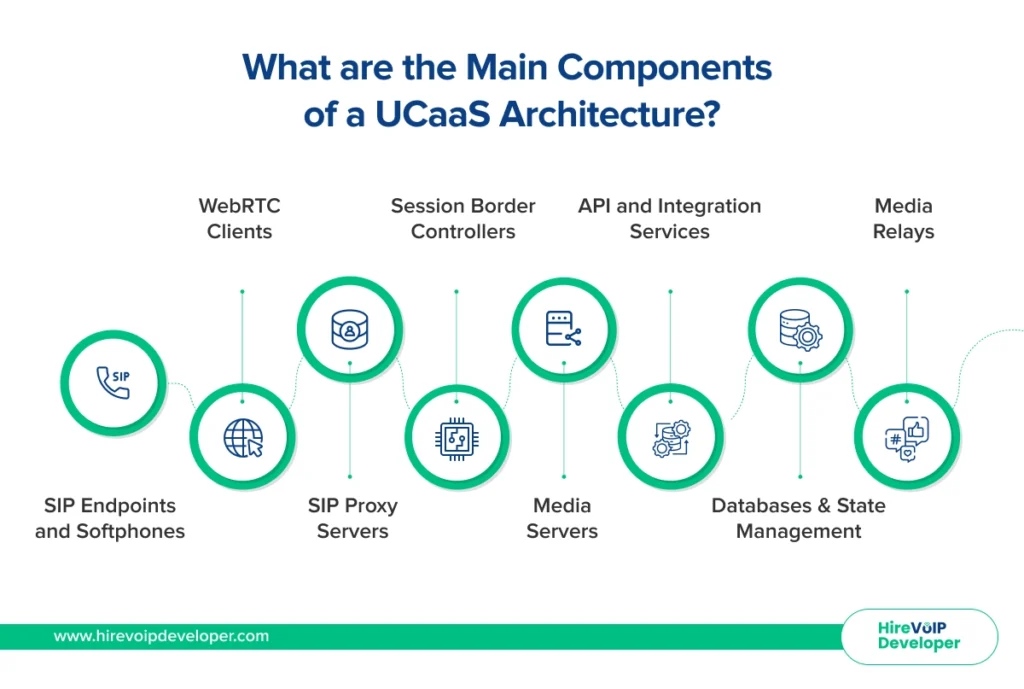
1. SIP Endpoints and Softphones
SIP endpoints are the devices that users interact with directly. These include IP phones, desktop applications, mobile apps, and softphones.
They initiate and receive communication sessions through the UCaaS platform.
2. WebRTC Clients
WebRTC clients enable browser-based voice and video communication. They allow users to join meetings and place calls without installing dedicated software.
This helps improve accessibility across devices and locations.
3. SIP Proxy Servers
SIP proxy servers manage signaling traffic across the platform. They process registrations, route calls, and direct communication requests between users and services.
These servers play a central role in session establishment.
4. Session Border Controllers
Session Border Controllers (SBCs) secure and control communication traffic at the network edge. They protect the platform from unauthorized access and help manage interoperability between networks.
SBCs also support topology hiding and protocol translation.
5. Media Servers
Media servers process real-time audio and video streams. They support conferencing, recording, transcoding, and other media-intensive functions.
Their performance directly affects communication quality.
6. Media Relays
Media relays transport RTP traffic between endpoints and media services. They help maintain reliable media delivery across networks and NAT environments.
This improves call stability and user experience.
7. Databases and State Management
Databases store user information, configurations, call records, and platform data. State management services maintain session information and operational context.
Together, they support platform reliability and service continuity.
8. API and Integration Services
API and integration services connect the UCaaS platform with business applications. Common integrations include CRM systems, helpdesk platforms, productivity tools, and workflow automation services.
These integrations extend communication capabilities across the organization. Behind these components, two distinct planes handle communication traffic.
What is the Difference Between the Signaling Plane and Media Plane in UCaaS?
The difference between the signaling plane and media plane in UCaaS is that the signaling plane manages communication sessions, while the media plane carries the actual voice and video traffic. Separating these functions improves scalability, performance, and service reliability.
Although they work together during every communication session, each plane handles a different type of workload.
SIP and RTP Traffic Flow
A communication session typically begins with SIP signaling messages. These messages help endpoints locate each other and negotiate session parameters.
Once the session is established, RTP traffic carries the actual audio and video streams. In simple terms, SIP controls the conversation, while RTP delivers it.
Signaling and Media Scalability
Signaling and media services often scale independently because their workloads differ significantly. Signaling servers primarily process session requests and routing decisions.
Media servers consume more resources because they handle audio and video processing. Separating these planes allows organizations to scale each service based on demand without affecting overall platform performance.
This is where the Session Border Controller plays a critical role.
How Do Session Border Controllers and WebRTC Work in UCaaS Architecture?
Session Border Controllers (SBCs) and WebRTC play a key role in modern UCaaS environments. As part of the overall SBC architecture, they help secure communications and enable seamless connectivity across networks, devices, and communication protocols.
SBCs manage and secure communication traffic at the network edge, while WebRTC allows users to access voice and video services directly from web browsers. Their combined role is essential for modern cloud communications.
1. SBC Placement in UCaaS Architecture
An SBC typically sits between external networks and the UCaaS platform. It acts as a control point for traffic entering and leaving the communication environment.
This placement helps protect core services while maintaining connectivity with carriers, partners, and remote users.
2. Hiding and Security
SBCs prevent external networks from viewing the internal structure of the platform. This process is known as topology hiding.
They also enforce security policies, filter malicious traffic, and support encryption for communication sessions.
3. B2BUA Functionality
Most SBCs operate as a Back-to-Back User Agent (B2BUA). Instead of simply forwarding traffic, they create separate communication sessions on each side of the connection.
This provides greater control over routing, security, and interoperability.
4. SIP-WebRTC Interworking
Many UCaaS environments support both SIP endpoints and WebRTC clients. SBCs help bridge these technologies when protocol or media differences exist.
This allows browser users and SIP-based devices to communicate seamlessly.
5. SFU Components for Collaboration
Selective Forwarding Units (SFUs) play an important role in video meetings and collaboration services. Instead of processing every media stream, an SFU forwards streams directly to participants.
This approach reduces infrastructure load and improves scalability for large meetings and collaboration sessions.
This is where the Session Border Controller plays a critical role.
Which Open Source Technologies Are Used in UCaaS Platforms?
The most common open source technologies used in UCaaS platforms include Kamailio, OpenSIPS, FreeSWITCH, Asterisk, RTPengine, Janus, mediasoup, Redis, and PostgreSQL.
These technologies power signaling, media processing, routing, conferencing, and data management across modern cloud communication systems.
Discussions around Kamailio vs FreeSWITCH often highlight how different components contribute to the overall UCaaS architecture, with each serving a distinct role within the platform.
1. Kamailio and OpenSIPS
Kamailio and OpenSIPS are SIP proxy servers used for signaling and call routing. They manage user registrations, session control, and traffic distribution across the platform.
Both are designed to handle high volumes of SIP traffic efficiently.
2. FreeSWITCH and Asterisk
FreeSWITCH and Asterisk provide media processing and communication services. They support voice calling, conferencing, IVR, recording, and media applications.
These platforms often serve as the communication engine within a UCaaS environment.
3. RTPengine
RTPengine is a media relay solution that manages RTP traffic between endpoints. It helps optimize media delivery and supports NAT traversal.
This improves connectivity and communication quality.
4. Janus and mediasoup
Janus and mediasoup are widely used for WebRTC services. They enable browser-based voice, video, and real-time collaboration capabilities.
These technologies are commonly deployed in meeting and conferencing applications.
5. Redis and PostgreSQL
Redis and PostgreSQL support state management and data storage. Redis provides fast
access to session and routing data, while PostgreSQL stores persistent platform information.
Together, they help maintain reliability, performance, and operational consistency. These technologies form the foundation for scalable and distributed UCaaS deployments.
How Do UCaaS Platforms Scale Across Multiple Regions?
As UCaaS platforms expand across regions, signaling, media, and data services are positioned closer to users to improve performance and reliability.
This distributed approach also makes it easier to accommodate the UCaaS customization you can ask for as communication requirements become more complex.
1. Multi-Region Deployment
Multi-region deployments place infrastructure in different geographic locations. Users connect to the nearest available region to reduce delays and improve responsiveness.
This model also helps support global communication services.
2. Media Anchoring
Media anchoring controls where RTP traffic is processed within the network. Media servers are typically positioned close to users to minimize latency.
This helps improve voice and video quality during communication sessions.
3. RTP Path Optimization
RTP path optimization reduces the distance that media traffic must travel. Instead of routing media through a centralized location, traffic follows the most efficient path available.
This improves call quality and reduces network overhead.
4. Load Balancing and High Availability
Load balancers distribute traffic across multiple servers and regions. This prevents individual systems from becoming overloaded during periods of high demand.
High-availability mechanisms ensure services remain accessible even if infrastructure components fail.
5. Disaster Recovery
Disaster recovery strategies protect communication services during unexpected outages.
Backup infrastructure and redundant systems allow workloads to shift between regions when needed.
This helps maintain business continuity and service reliability.
What Is the Difference Between UCaaS, CPaaS, CCaaS, and Hosted PBX?
The difference between UCaaS, CPaaS, CCaaS, and Hosted PBX lies in their architecture, purpose, and service delivery models. While all support business communications, they are designed to solve different operational and technical requirements.
Understanding these architectural differences helps organizations select the right platform for their communication strategy.
1. Architectural Differences
UCaaS provides a complete communication environment that combines voice, video, messaging, meetings, and collaboration services within a single platform.
CPaaS delivers communication capabilities through APIs that developers can embed into applications and workflows.
CCaaS focuses on customer interactions and contact center operations. Its architecture is optimized for routing, agent management, analytics, and customer engagement.
Hosted PBX primarily delivers cloud-based telephony. It offers calling features but typically lacks the broader collaboration capabilities found in UCaaS platforms.
2. Infrastructure Comparison
UCaaS architectures include signaling, media, collaboration, and user management services. They are built to support unified communication across the organization.
CPaaS platforms expose communication services through programmable APIs. Developers use these APIs to create custom communication experiences.
CCaaS platforms add customer service infrastructure such as omnichannel routing, workforce management, and reporting systems.
Hosted PBX environments focus mainly on call control, extensions, voicemail, and basic telephony services.
Architecture Comparison Table
Each model serves a different role. UCaaS is designed for organization-wide communication, while CPaaS, CCaaS, and Hosted PBX address more specialized communication needs.
Together, these layers and components define how modern UCaaS platforms operate.
Wrapping Up
The growing UCaaS market highlights why architecture matters. Industry forecasts estimate the UCaaS market could exceed $172.691 billion by 2030, driven by cloud adoption, hybrid work, and integrated communication services.
Organizations that understand the layers, components, and traffic flows behind UCaaS are better positioned to build scalable and reliable communication platforms.
At Hire VoIP Developer, we help build an architecture tailored to your performance, scalability, and business goals.